
Oracle to Salesforce Migration: The Data Challenges You Should Expect

Moving from Oracle to Salesforce can help businesses create a more flexible environment for managing customer relationships, sales processes, service operations, and reporting. However, an Oracle to Salesforce migration involves much more than exporting data from Oracle and importing it into Salesforce.
The real challenge is ensuring that the data being migrated is clean, complete, accurately mapped, secure, and usable within Salesforce.
Organizations may encounter several data and operational challenges during an Oracle to Salesforce migration, including duplicate records, inconsistent data, historical information, custom fields, integration dependencies, migration downtime, user adoption, and data governance.
Identifying these challenges early allows businesses to address data-quality issues, define clear migration rules, and reduce the risk of problems during testing and go-live.
In this guide, we explore the key Oracle to Salesforce migration challenges businesses should expect and the six practical steps they can take to prepare their data and improve migration outcomes.
What Is Oracle to Salesforce Migration?
Oracle to Salesforce migration is the process of moving relevant business data and related information from an Oracle system into Salesforce.
Depending on the organization, the migration may include:
Customer and account information
Contact records
Sales and opportunity data
Service information
Product and transaction records
Historical customer activity
Custom business data
Attachments and related files
Reference data
Records required by connected business processes
The process usually involves several stages:
Oracle data assessment → Data cleansing → Data mapping → Transformation → Salesforce data loading → Testing → Validation → Go-live
The objective is not simply to move as many records as possible. The objective is to move the right data into the right Salesforce structure without losing business context or data relationships.
Why Is Oracle to Salesforce Data Migration Challenging?
Oracle and Salesforce are built around different data structures and business models. A field, relationship, workflow, or process that works in Oracle may not have a direct equivalent in Salesforce. Some data may need to be transformed, combined, separated, archived, or excluded.
For example, an Oracle database might contain several customer-related tables that need to be represented through Salesforce Accounts, Contacts, custom objects, or relationships.
That means a successful migration requires decisions about:
What data should be moved?
Where each record should go?
How should these fields be mapped?
Which values need transformation?
Which historical records are still required?
How will duplicate records be handled?
How will integrations be affected?
How will migrated data be validated?
These decisions should be made before the production migration begins.
7 Data Challenges to Expect During Oracle to Salesforce Migration
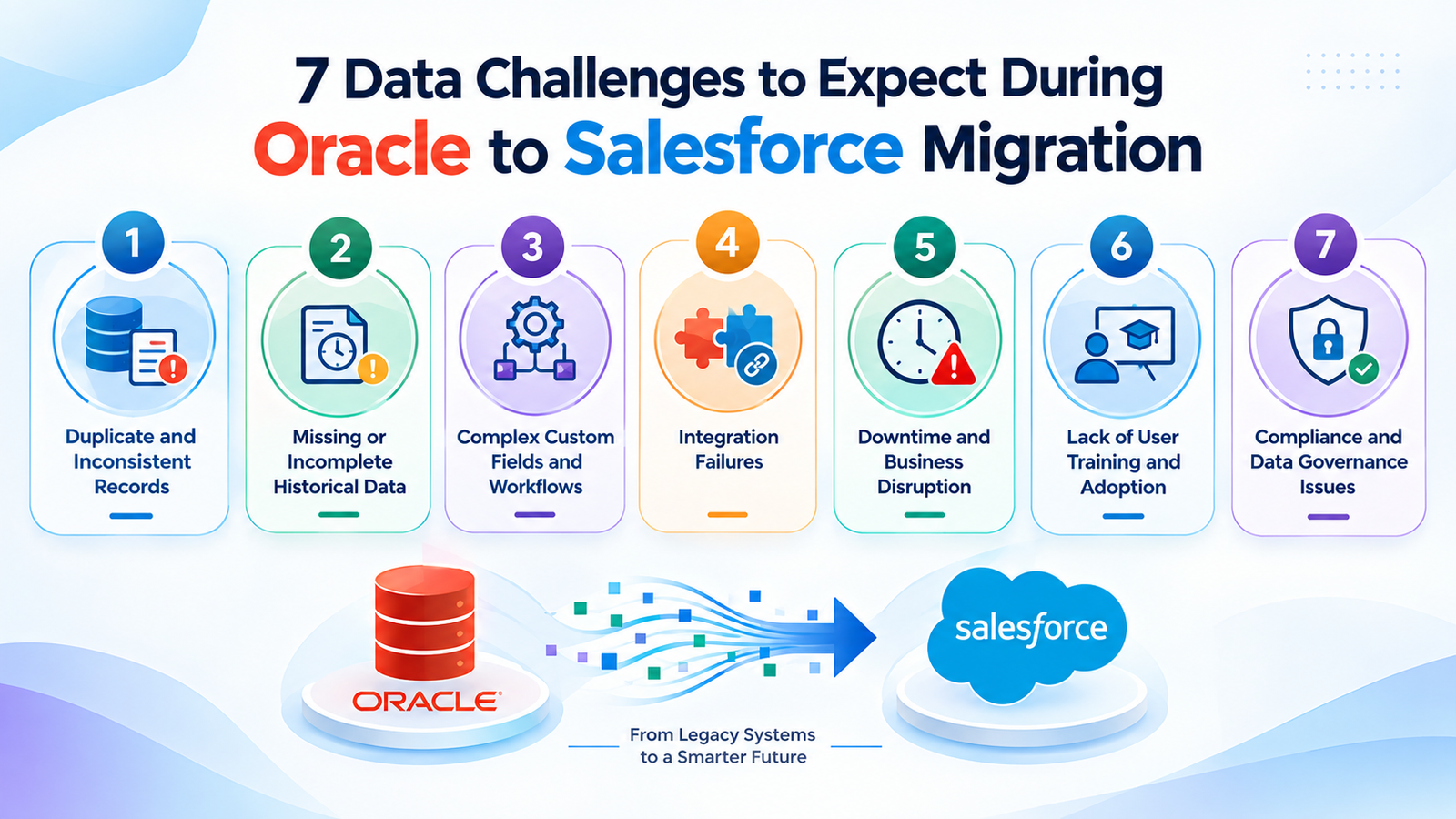
1. Duplicate and Inconsistent Records
Poor data quality can have a significant impact on business operations. Gartner estimates that organizations lose an average of $12.9 million annually due to poor data quality. While this figure is not specific to Oracle or Salesforce migrations, it highlights why data quality should be treated as a business priority, not just a technical task.
One of the first issues to identify before an Oracle to Salesforce migration is duplicate and inconsistent data.
Over time, customer and business records may be created by different teams, applications, or processes. This can result in the same company or individual appearing multiple times with variations in names, contact details, addresses, or other information.
For example:
ABC Corporation
ABC Corp.
ABC Corporation Ltd.
These records could represent the same organization but may appear as separate records in Oracle.
Other inconsistencies include:
Different formats of phone numbers
Multiple email addresses
Inconsistent address formats
Company names spelled differently
Unknown customer identifiers
Outdated contact details
Duplicate contacts associated with different accounts
Moving information without first cleaning it can lead to duplicate data quality issues in Salesforce.
How to Address It
Before migration, profile the Oracle data and establish rules for identifying duplicate or conflicting records.
Team members should determine:
How many records belong to the same customer?
How should the primary record be determined?
Which field contains the most reliable information?
Should duplicate records be merged, excluded, or retained for a specific reason?
Data cleansing should happen before the final production load rather than relying on users to clean thousands of records after Salesforce goes live.
2. Missing or Incomplete Historical Data
Historical data often creates difficult migration decisions.
A business may have years of information stored in Oracle, but that does not mean all of it needs to become active in Salesforce data.
For example, an organization might have:
A ten-year history of customer records
History of transactions
Inactive accounts
Archived service records
A list of legacy contact information
Historical activities
Records associated with discontinued products
Migrating everything can increase data volume and complexity without operational value.
On the other hand, leaving important historical information behind can make it harder for sales and service teams to understand customer history.
How to Address It
Divide historical data into three categories: Migrate → Archive → Exclude
Data that users actively need should be available in Salesforce. Older information that must be retained but does not need to be operational can be archived according to the organization's requirements.
Before migration, ask:
How far back does the business need operational history?
Which records are needed for reporting?
Which information is required for customer service?
Are there retention requirements?
Which inactive records can be archived?
This makes the migration more manageable and prevents Salesforce from becoming a storage location for unnecessary legacy information.
3. Complex Custom Fields and Workflows
Salesforce customizations can make an Oracle-to-Salesforce migration more complicated than a standard data transfer.
An Oracle environment may contain custom fields, tables, business rules, calculated values, and processes that were developed specifically for the organization.
Salesforce may handle the same business requirement using:
Standard objects
Custom objects
Custom fields
Record types
Picklists
Relationships
Validation rules
Flows
Approval processes
Apex
Other Salesforce automation
A direct one-to-one field mapping may therefore not always be possible.
MV Cloud's Approach for Field Mapping
Create a mapping document before migration to clearly define how Oracle fields will be transferred, transformed, and validated in Salesforce.
| Oracle Source | Salesforce Target | Migration Consideration |
|---|---|---|
| Customer ID | External ID | Preserve source reference |
| Customer Name | Account Name | Standardize naming |
| Contact Email | Validate format | |
| Customer Type | Account Type | Map Oracle values to Salesforce values |
| Sales Status | Opportunity Stage | Define transformation rules |
The important point is that not every Oracle field automatically needs a Salesforce equivalent.
For each field, the migration team should decide whether it should be:
Migrated as-is
Transformed
Combined with another field
Split into multiple fields
Stored in a custom Salesforce object
Archived
Excluded
This prevents unnecessary fields from being carried into the new Salesforce environment.
4. Integration Failures
An Oracle environment rarely operates in isolation.
It may exchange data with:
ERP systems
Finance applications
Marketing platforms
Data warehouses
Middleware
Reporting tools
Payment systems
External applications
Internal APIs
When Oracle is replaced or its role changes, these integrations may also need to change. For example, an application that previously retrieved customer information from Oracle may need to retrieve that information from Salesforce after migration.
If these dependencies are not identified early, an integration may continue sending data to the wrong system or stop working altogether.
How to Reduce Integration Risk
Create an integration inventory before migration.
For every connected system, document:
What data is exchanged
Which system is the source of truth
How often data is synchronized
Which APIs or middleware are involved
What happens when a record changes
What happens when a migration occurs
Testing should cover both the migrated Salesforce data and the connected applications that depend on it.
5. Downtime and Business Disruption
Migration can affect normal business operations, particularly when the source system contains frequently changing data.
The challenge is not only moving the initial data. The organization also needs to account for changes made between the initial extraction and the final Salesforce go-live.
For example, suppose customer records are extracted from Oracle on Monday, but users continue updating those records until Friday.
The Salesforce environment may then contain outdated information unless those changes are captured during the final migration stage.
How Businesses Can Reduce Disruption
A migration plan may include:
Test migrations
Multiple data loads
Incremental migration
Final data synchronization
A defined cutover window
Post-load validation
Rollback planning
The appropriate approach depends on the organization's data volume, system architecture, business requirements, and acceptable downtime.
The key is to plan the cutover rather than treating it as the final technical step.
6. Lack of User Training and Adoption
A technically successful migration can still create business problems if employees are not prepared to work in Salesforce.
Users may be accustomed to Oracle-based processes and may not immediately understand:
Where customer information is stored
How records are updated
How sales stages work
How to complete tasks
Where reports are located
Which fields are required
How new workflows operate
This can lead to incorrect data entry, incomplete records, workarounds, and low adoption.
How to Prepare Users
User adoption should be part of the migration plan, not an activity added after go-live.
Consider:
Role-based Salesforce training
Process documentation
User acceptance testing
Short workflow guides
Training for administrators and managers
Post-go-live support
For example, sales representatives may need training focused on Accounts, Contacts, Leads, Opportunities, and activities, while service teams may need training around Cases, customer history, and service workflows.
The aim is to make sure employees understand how their daily work changes after the migration.
7. Compliance and Data Governance Issues
Moving data between systems also creates data governance considerations.
The organization needs to understand what information is being moved, who can access it, how long it needs to be retained, and how it should be protected.
This can become particularly important when the Oracle environment contains sensitive customer or business information.
Areas to review include:
User access
Data classification
Field-level access
Record visibility
Data retention
Audit requirements
Backup and recovery
Data ownership
Sensitive information
Governance requirements should be considered before the data is extracted.
Simply moving data into Salesforce does not automatically make the resulting environment compliant with an organization's internal policies or applicable requirements.
How to Prepare for an Oracle to Salesforce Data Migration
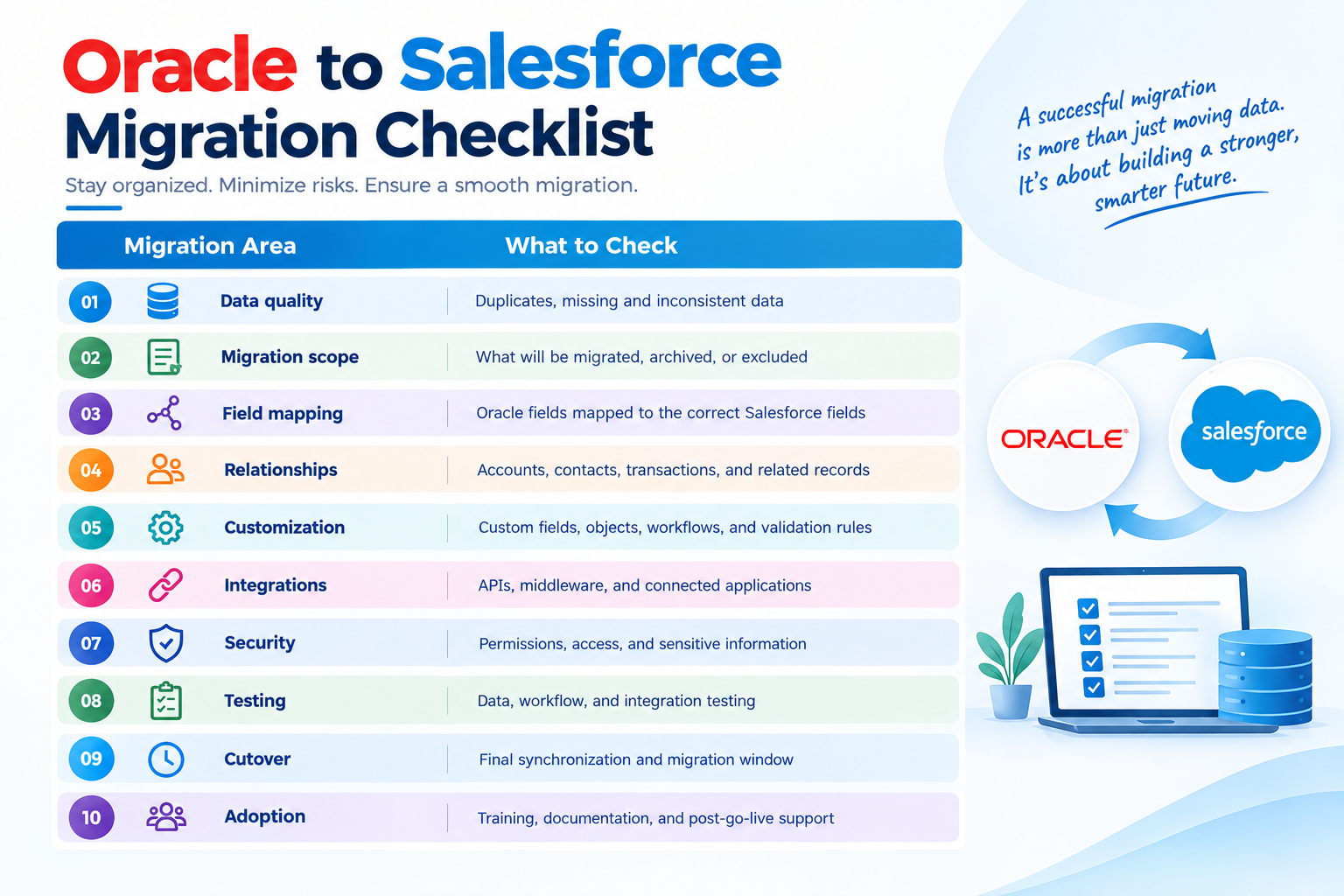
A structured preparation process can identify many migration problems before they affect production.
1. Audit the Existing Oracle Data
Start by understanding what is actually stored in the source environment.
Review:
Data volume
Duplicate records
Missing values
Inconsistent formats
Inactive records
Custom fields
Relationships
Historical information
Data ownership
Integration dependencies
Assessment creates a realistic picture of the migration effort.
2. Define What Will Be Migrated
Do not begin with the assumption that every Oracle record needs to move.
Create a clear classification:
| Data Category | Recommended Action |
|---|---|
| Active business data | Migrate |
| Required historical records | Migrate |
| Required but inactive history | Consider archive or controlled access |
| Duplicate records | Clean before migration |
| Obsolete records | Exclude where appropriate |
| Unused legacy fields | Review before migration |
This helps keep the Salesforce environment focused on useful business information.
3. Build a Data Mapping Document
Data mapping is one of the most important parts of the migration.
For every important data element, document: Oracle Source → Salesforce Target → Transformation Rule → Validation Rule
For example: Oracle Customer Type → Salesforce Account Type → Convert legacy values → Confirm against approved Salesforce values.
This gives technical and business teams a shared reference during migration.
4. Clean the Source Data
Data cleansing should address issues before they are transferred.
Depending on the source data, this may include:
Removing duplicates
Standardizing names
Validating email addresses
Normalizing phone numbers
Correcting inconsistent values
Identifying missing information
Removing obsolete records
Resolving conflicting customer information
The cleaner the source data, the easier it becomes to validate the Salesforce environment after migration.
5. Run a Test Migration
A production migration should not be the first time the organization moves its data. Run one or more test migrations using representative data.
Validate:
Record counts
Field values
Relationships
Required fields
Custom objects
Automation
Reports
Integrations
User access
Testing can reveal mapping problems that are difficult to identify by looking only at the source data.
6. Validate the Migrated Data
After the data is loaded into Salesforce, compare it against the original Oracle data. Validation should include both technical and business checks.
Technical Validation
Check:
Number of records migrated
Failed records
Missing values
Relationship integrity
Field mapping
Error logs
Business Validation
Ask users to verify:
Customer information
Historical records
Sales information
Service information
Reports
Business workflows
A migration should not be considered complete simply because the data load finished successfully.
How Long Does an Oracle to Salesforce Migration Take?
There is no reliable single timeline for every Oracle to Salesforce migration.
The effort depends on factors such as:
Number of records
Number of Oracle databases or source systems
Data quality
Number of Salesforce objects
Customization
Integration complexity
Historical data requirements
Data transformation requirements
Testing requirements
Availability of business users for validation
A small migration involving a limited number of clean datasets may be relatively straightforward. A large enterprise migration with years of historical information, complex relationships, custom processes, and multiple integrations requires considerably more planning and testing.
For this reason, migration timelines should be estimated after discovery and data assessment, rather than based only on record volume.
What Happens If Oracle Data Is Not Cleaned Before Migration?
Moving poor-quality data into Salesforce does not solve the underlying data problem.
Instead, the organization may end up with:
Duplicate Salesforce records
Incorrect customer information
Broken or incomplete relationships
Inaccurate reports
Failed automation
More manual cleanup
Lower user confidence in Salesforce
The principle is simple:
Data-quality problems are generally easier to identify and address before migration than after thousands or millions of records are loaded into Salesforce.
A proper cleansing process can therefore save time during testing and reduce cleanup work after go-live.
Oracle to Salesforce Migration Best Practices
A successful migration depends on both technical planning and business preparation.
Assess the source data before designing the migration.
Define what should be migrated, archived, or excluded.
Create a detailed field-mapping document.
Clean duplicate and inconsistent records before loading.
Preserve important source identifiers where they are needed for reference or integration.
Review data relationships, not just individual fields.
Identify integration dependencies early.
Test migrations before production cutover.
Validate the migrated data with business users.
Plan the final cutover and synchronization process carefully.
Train users before Salesforce goes live.
Monitor data quality and system performance after migration.
When Should You Consider Professional Salesforce Migration Support?
Some organizations can manage parts of a migration internally, particularly when the data structure is simple and the Salesforce environment is relatively standard.
Professional migration support can become valuable when the project involves:
Large or complex Oracle databases
Multiple source systems
Extensive customizations
Complex data relationships
Significant historical data
Multiple integrations
Complex business processes
Strict data governance requirements
Limited internal Salesforce expertise
A business-critical Salesforce implementation
A Salesforce migration partner can help coordinate discovery, data mapping, transformation, migration, testing, integration planning, and validation.
The aim should not simply be to complete the Salesforce Org Migration.
The goal is to create a Salesforce environment that users can trust and use effectively after the transition.
Final Thoughts
An Oracle to Salesforce migration is ultimately a data and business transformation project, not simply a database transfer.
The biggest risks often arise when organizations migrate unclean data, overlook valuable historical information, underestimate customizations, miss integration dependencies, or leave user training until the end.
A structured approach can reduce these risks. Start by assessing the existing Oracle environment, defining the migration scope, cleansing and standardizing data, mapping fields carefully, testing the migration, validating the results, and preparing users for new Salesforce processes.
With the right planning, Oracle to Salesforce Data Migration can provide a cleaner foundation for sales, service, reporting, and future Salesforce development without carrying unnecessary legacy data and process problems into the new environment.
Frequently Asked Questions
1. What is Oracle to Salesforce migration?
Oracle to Salesforce migration is the process of moving selected business data from an Oracle environment into Salesforce. The process can include data assessment, cleansing, field mapping, transformation, loading, testing, and post-migration validation.
2. What is the biggest challenge in Oracle to Salesforce Data Migration?
Data quality is often one of the biggest challenges. Duplicate records, inconsistent formats, missing values, outdated information, and complex relationships can create problems if they are transferred without proper preparation.
3. Can all Oracle data be migrated to Salesforce?
No. Some Oracle data may need to be transformed, archived, or excluded because Salesforce uses a different data structure. The migration scope should be determined after reviewing business requirements and the source data.
4. How do you prevent duplicate records during an Oracle to Salesforce migration?
Start by identifying and resolving duplicate records in Oracle before the production migration. Standardize key fields such as company names, email addresses, phone numbers, and customer IDs to ensure consistent record matching.
Salesforce explicitly supports External ID matching during data import, which helps match incoming records with existing Salesforce records and avoid duplicates. You can also use Salesforce Matching Rules and Duplicate Rules to identify and prevent duplicate records during and after the migration.
5. How should historical Oracle data be handled?
First, determine which historical information is still required for business operations, reporting, customer service, or other requirements. Necessary history can be migrated, while information that only needs to be retained may be archived rather than loaded as active Salesforce data.
6. Can Oracle workflows be moved directly into Salesforce?
Not necessarily. Oracle workflows and Salesforce automation use different technologies and structures. Business requirements should be reviewed and the relevant processes should be redesigned using appropriate Salesforce capabilities.
7. What happens to integrations connected to Oracle?
Existing integrations may need to be redesigned, replaced, or redirected to Salesforce. Before migration, create an inventory of connected systems and document what information each integration sends or receives.
8. How can a business reduce downtime during migration?
Businesses can reduce disruption by conducting test migrations, planning a defined cutover window, using incremental migration where appropriate, completing final synchronization, and validating the Salesforce environment before users begin working in it.
9. Is user training necessary after migrating from Oracle to Salesforce?
Yes. Salesforce may change how users manage records, follow processes, complete tasks, and access reports. Role-based training and clear documentation can help users adopt the new system more effectively.
10. How do you validate data after the Oracle to Salesforce migration?
Validation should include record counts, field values, relationships, required fields, business rules, reports, integrations, and sample records. Business users should also verify that the migrated information supports their day-to-day processes.
11. How long does Oracle to Salesforce migration take?
The timeline depends on data volume, data quality, customization, integrations, historical data, transformation requirements, testing, and business availability. A realistic estimate should be created after a discovery and data assessment rather than based only on the number of records.
