
Salesforce Winter ’27 Agentforce for Sales: What’s New (PART - 1)
Sales teams spend too much time researching prospects, updating opportunities, preparing for meetings, and following up with customers.
Salesforce Winter ’27 brings new Agentforce capabilities designed to reduce some of this manual work and give sales teams more useful information at the point where they need it.
Salesforce is now calling Sales Cloud Agentforce Sales, and this release puts more emphasis on using AI across the sales cycle from prospecting and lead engagement to pipeline management, forecasting, coaching, and follow-up.
But there is an important distinction.
Winter ’27 isn't simply about giving salespeople an AI chatbot.
The more useful changes are the ones that help Salesforce identify what deserves attention, prepare information, recommend an action, and, in some cases, carry out part of the work.
For a business considering an Agentforce implementation, that shift is worth paying attention to.
The question is not whether your sales team needs another AI tool.
The better question is:
Which parts of your sales process are slowing your team down, and where can
Does Agentforce actually help?
Let's talk about Salesforce Winter ’27 updates for Sales Cloudand what they could mean for sales teams and business leaders.
What’s New in Salesforce Winter ’27 for Sales?
The Winter ’27 sales updates cover several areas:
Agentforce Engagement
Agentforce Prospecting
Agentforce Sales Management
Sales Workspace
Call Coaching
Sales Engagement
Pipeline Forecasting
Pipeline Inspection
Sales Performance Management
Microsoft and email integrations
Account plans and relationship management
Not every feature will matter to every organization.
The real question is:
Which of these changes can remove a bottleneck in your current sales process?
Let's look at the updates from that perspective.
1. Agentforce Engagement Gets a New Direction
One of the first changes you will notice is the name.
Agentforce Lead Nurturing is now Agentforce Engagement.
That change reflects a broader approach to how Salesforce wants AI to participate in ongoing prospect engagement.
Winter ’27 also introduces a newer version of Agentforce Builder for engagement agents, based on Agent Script. Salesforce says this provides more flexibility when configuring agent behaviour and makes it easier to apply business rules and guardrails.
For businesses, that matters because automated outreach cannot be treated like a simple email sequence.
Different prospects need different handling.
A high-value enterprise account may need stricter review than a low-risk prospect. A particular industry may require specific messaging. Some contacts may need human approval before an email goes out.
The new approach gives admins more control over those rules.
Manual review can also become more selective
Winter ’27 gives sales teams more control over which agent-generated emails require human review.
Instead of choosing between reviewing everything or letting everything go automatically, teams can configure review for:
All emails
Initial outreach only
Specific situations based on record criteria
Salesforce also supports using a custom flow to determine which messages should be reviewed .
That is a practical improvement for businesses that want automation without giving up control.
The goal isn't to remove the salesperson from the process. It is to decide where their judgement adds the most value.
2. Agentforce Prospecting Can Work Before the Rep Starts Their Day
Previously, an SDR or salesperson might need to initiate prospect research.
Now, Agentforce Prospecting can be scheduled to run automatically.
Admins can define the day, time, and frequency of the runs.
The idea is simple: prospects can be researched and prepared before the sales rep starts working through their list.
Think about the difference.
Traditional process
Rep starts work → searches for prospects → researches accounts → decides
who to contact
With scheduled prospecting
Agent researches → identifies prospects → prepares the list → rep starts outreach
The salesperson still makes the relationship-building decisions. But some of the preparation has already happened.
For teams with large prospecting volumes, this could make the beginning of the day much more productive.
3. Agentforce Can Prioritize Prospects Based on Recent Engagement
A list of 500 prospects isn't particularly useful if every prospect looks equally important.
Winter ’27 adds the ability for Agentforce Prospecting to prioritize contacts based on recent engagement.
Sales teams can configure the level of engagement they want the agent to consider. Contacts that interacted with the business during the previous 12 months can be surfaced as higher-priority prospects.
This creates a useful distinction between:
“People who fit our target profile”
and
“People who fit our target profile and have already shown some interest.”
For sales leaders, that distinction can be valuable.
A prospect who recently engaged with your business may deserve attention. before someone who simply matches the ideal customer profile.
A practical example
Imagine a B2B company has 2,000 potential contacts. Instead of asking an SDR to work through the entire list, Agentforce can help identify people who:
Match the company's prospecting criteria
Have recently interacted with the business
Meet the configured engagement threshold
The rep can then start with the warmer opportunities.
That is a much more useful application of AI than simply generating another list of names.
How to Enable It
Create or edit a prospecting agent, and on the Add Sources page, open Advanced Settings. Select Boost Contacts with Past Engagement, then choose the engagement level you want the agent to target.
4. Prospecting Can Extend Beyond the Rep’s Own Accounts
Winter ’27 also expands how Agentforce Prospecting can work with accounts ownership.
Organizations can configure the prospecting agent to research accounts owned by users who aren't prospecting users and route the resulting prospects to the appropriate SDRs.
This can be useful for larger sales organizations where:
Account executives own strategic accounts
SDRs handle prospecting
Sales development teams are organized by region
Different teams share account responsibilities
Without a structured process, prospecting opportunities can remain hidden within individual account portfolios. This capability helps create a more coordinated process between account ownership and prospecting.
5. More Visibility Into What the Prospecting Agent Actually Did
One concern businesses often have with AI agents is simple:
“What did it actually do?”
Winter ’27 gives admins and sales reps more visibility into prospecting agent activity. The Agent Activity view can show agent sessions, the records it searched, and why records were qualified or disqualified.
This helps in two ways:
Managers can see whether the agent is producing useful results.
Admins can identify issues with the prospecting criteria.
For example, if the agent repeatedly excludes accounts that sales managers consider valuable, the problem may not be the AI itself. It could be the configuration or qualification criteria.
By reviewing the agent's activity, teams can identify these issues and adjust the setup accordingly.
6. Agentforce Sales Management Helps Turn Meetings Into Follow-Up Work
A sales meeting does not create value just because it happened. The real work starts afterward.
Someone has to:
Send the promised information
Schedule another meeting
Update the opportunity
Record next steps
Follow up with stakeholders
Keep the deal moving
Agentforce Sales Management can analyze conversation transcripts and suggest follow-up actions after meetings.
For example, it can recommend sending a follow-up email or scheduling another meeting and help draft the communication. Sellers can review and approve those suggestions.
This is a good example of where AI can fit naturally into an existing workflow.
The salesperson still decides what should happen.
The system helps with the work required to make it happen.
Why this matters
A common sales problem is not a lack of activity.
It is lost momentum.
A promising meeting happens on Tuesday.
The follow-up goes out Friday.
The customer has already moved on to another priority.
Reducing that gap can have more commercial value than another analytics dashboard.
7. Pipeline Management Setup Becomes Easier
Agentforce Pipeline Management is also getting a more practical setup path.
Winter ’27 introduces a Pipeline Management Configuration Skill that can use natural-language instructions to help configure opportunity fields for Agentforce pipeline management.
For example, an admin can specify fields such as:
Next Step
Risk
Other opportunity updates
The skill handles the required setup steps. Once configured, sellers can review and approve suggested updates in Pipeline Inspection. Organizations can also enable autonomous updates where appropriate.
For Salesforce administrators, this can reduce some of the setup work involved in introducing AI.
However, I wouldn't recommend enabling autonomous updates on important opportunity fields from day one. Start with recommendations, measure accuracy, and introduce autonomy where it makes sense.
8. Sales Workspace Can Now Use Your Own Business Signals
Every sales organization has its own definition of a “deal that needs attention.”
For one company, it might be:
No activity for 14 days.
For another:
An important opportunity has an unresolved support escalation.
Winter ’27 allows businesses to create custom signals using their own business logic or AI reasoning and surface those signals in the Sales Workspace recommendations feed. Salesforce says these recommendation records can be created with Flow or Apex and connected to an action.
This is where the standard Salesforce experience can become more relevant to the way your company actually sells. Instead of giving every sales team the same generic recommendations, organizations can build signals around their own process.
Example
A company selling enterprise software may define a custom signal:
“Strategic opportunity has no executive stakeholder identified.”
The signal appears in the seller's workspace.
The recommended action could be:
Review account stakeholders.
Sales Workspace can also surface prioritized signals when an escalated open case is connected to an important opportunity or bookmarked account. Sellers can review the case or take action without leaving the workspace.
Businesses can also track how sellers respond to these recommendations, including which signals are acted on or dismissed over a 90-day period.
9. Agentforce Assist Can Be Opened Directly From Sales Recommendations
Winter ’27 brings Sales Workspace recommendations and Agentforce Assist closer together.
Admins can configure a platform action that lets sellers open Agentforce Assist directly from a prioritized signal. This gives sellers contextual help for the related record without leaving Sales Workspace.
For example:
Seller sees a prioritized signal → Opens Agentforce Assist → Gets help with the related record
How to Configure It
Create an Agent Quick Action and assign it to a signal type from the Sales Workspace Actions setup page.
Where It Applies
This update applies to Lightning Experience in Enterprise, Unlimited, and Agentforce 1 Sales editions with the Sales Foundation add-on.
This removes an extra step for sellers who need help with a specific account, opportunity, or other related record.
It also reflects a broader direction in Winter ’27:
Context first. Action second.
Key Insights: Instead of making sellers leave their workflow to find information or assistance, Salesforce can bring relevant help directly into the workspace.
10. Salesforce Can Surface Escalated Cases That Put Deals at Risk
A customer may have an open sales opportunity while also dealing with a serious support problem.
If the sales team does not know about that service issue, the account strategy can quickly become disconnected from reality.
Winter ’27 adds prioritized signals when an escalated open case is connected to an important opportunity or bookmarked account. Sellers can review the case directly from the Sales Workspace feed or post in Slack without leaving the workspace.
How to Find Escalated Cases
On the Sales Workspace page, look for escalated cases in the All Signals section.
To discuss an escalated case in Slack, click Post in Slack next to the relevant signal.
Where It Applies
This feature is available in Lightning Experience in Enterprise, Unlimited, and Agentforce 1 Sales editions with the Sales Foundation add-on.
This helps sales teams spot customer issues that could affect active deals or important accounts before they become bigger problems.
11. Sales Workspace Can Show Which Recommendations Sellers Act On
Teams can see which signal types sellers act on and which ones they dismiss, with data retained for 90 days. This can help sales leaders identify which recommendations are actually useful and which may need to be adjusted.
This creates an important feedback loop:
Recommendation → Seller response → Measurement → Improvement
How to Create the Report
From Reports, create a report using the Home Page Recommendations report type under Administrative Reports.
You can also create a custom report type using Prioritized Recommendation and Prioritized Recommendation Item.
Where It Applies
This feature is available in Lightning Experience for Enterprise and Unlimited editions, as well as Agentforce 1 Sales editions with the Sales Foundation add-on.
The bigger benefit is continuous improvement. Instead of assuming a recommendation is useful, sales teams can look at how sellers actually respond to it and refine their signals accordingly.
12. Opportunity Scoring/Pipeline Inspection Gets More Context
Salesforce is also improving how it assesses deal health.
Improve the Opportunity Scoring model powered by Data 360 AI models. Instead of relying only on standard opportunity fields, the model can use conversation data and engagement signals to help identify healthy and at-risk deals.
This gives sales reps more context when deciding which opportunities need attention.
For example, an opportunity may look healthy based on its stage, amount, and activity fields. But if recent customer conversations show declining engagement, the enhanced scoring model can provide another signal that the deal may be at risk.
13. Call Coaching Moves Further Into Structured Sales Coaching
Sales managers often know which reps need help. The harder part is creating a consistent coaching process.
Winter ’27 expands Call Coaching to video calls for Einstein Conversation Insights users. Managers can define competencies and evaluate calls against them. Salesforce supports up to eight active competencies.
With Agentforce for Sales, teams can use AI-powered evaluations. Without Agentforce for Sales, managers can still evaluate calls manually.
For example, a sales organization could coach around:
Discovery
Objection handling
Competitive positioning
Closing
Next-step confirmation
Instead of vague feedback like:
“You need to ask better questions.”
Managers can evaluate specific competencies based on the actual conversation.
Why This Matters for Growing Teams
A 10-person sales team can often rely on direct manager coaching. A 100-person sales organization needs a more consistent approach.
Call Coaching gives sales leaders a structured way to evaluate conversations and standardize coaching across the team.
14. Salesforce Forecasting Gets More Deal Context
Forecasting isn't just about predicting a number. Sales managers also need to understand what is happening inside the deals behind that number.
Forecasting is another area getting a practical upgrade. Salesforce now provides more intelligence directly into pipeline forecasting, including:
Deal risks
Methodology scores
Contact insights
Agent activity
Activity heatmaps
The aim is to provide sales leaders with more context while viewing the pipeline, instead of forcing them to jump between multiple screens.
A forecasting review can otherwise become surprisingly manual:
Check the forecast → Open opportunities → Review activity → Check recent conversations → Ask the rep what changed.
By bringing more relevant information into the forecasting view, Salesforce can reduce some of that manual detective work.
15. Post-Meeting Voice Notes Help Reps Capture More Context
Not every customer conversation gets recorded or transcribed. Sometimes the most important insight comes to the rep after the meeting.
Winter ’27 adds post-meeting voice notes to the Salesforce mobile app. Reps can record a quick note after a meeting, have it transcribed on the device, and sync the text to Einstein Conversation Insights.
This helps solve a common CRM problem:
“I'll update Salesforce later.”
Later often becomes tomorrow or never.
Capturing the note while the conversation is still fresh makes it easier for reps to keep Salesforce updated without typing a long meeting summary on their phone.
16. Sales Engagement Data Is Now Stored Natively on Salesforce
Sales engagement is also getting an important architectural change.
Winter ’27 stores Sales Engagement data natively on the Salesforce Platform, with new and updated reports and the Sales Engagement Sample Dashboard available for analysis.
For sales operations teams, this can make it easier to analyze individual engagements and broader engagement trends alongside other CRM data.
One change deserves attention: the Sales Engagement Performance Dashboard is scheduled for retirement in November 2026. Organizations using it should plan to move to the Sales Engagement Sample Dashboard.
This is less about a new sales feature and more about making engagement data easier to work with and report on.
17. Account Plans Get a More Guided Setup
Winter ’27 also simplifies the setup experience for Account Plans through Salesforce Go.
Instead of sending admins to the legacy Setup experience, Salesforce provides a guided configuration process from one location. Admins can enable Account Plans, complete the required and advanced setup, and provide users with the necessary access through a permission set.
It may not be an Agentforce headline, but it supports the broader goal of getting sales processes properly configured.
Good AI starts with good sales processes.
18. Microsoft and Email Changes Deserve Attention Too
Not every important Winter ’27 change is an AI feature.
Salesforce is continuing to update its Microsoft 365 and email integrations, including changes involving Microsoft Graph, Einstein Activity Capture, Lightning Sync, and Salesforce for Outlook.
These changes matter because sales AI depends heavily on activity data emails, meetings, calendar information, and customer interactions.
If that data isn't being captured reliably, Agentforce has less information to work with.
So, when preparing for Winter ’27, don't look only at the Agentforce configuration. Review the data flowing into Salesforce as well.
What Should Sales Leaders Actually Care About?
Winter ’27 includes a lot of new capabilities. But if I were reviewing the release with a B2B sales organization, I would focus on five business outcomes:
| Business Challenge | Winter ’27 Capability |
|---|---|
| SDRs spend too much time researching prospects | Agentforce Prospecting |
| Leads aren't followed up consistently | Agentforce Engagement |
| Reps lose momentum after meetings | Agentforce Post-Meeting Suggestions |
| Managers struggle to identify risky deals | Opportunity Scoring + Pipeline Forecasting |
| Sales coaching varies between managers | Call Coaching |
That is a better way to evaluate the release than asking: “Which new AI features should we turn on?”
Instead, ask: “Where is our sales team losing time, information, or deal momentum?”
Then map the relevant Salesforce capability to that problem.
Where Winter ’27 Could Make the Biggest Difference
For a B2B organization, four areas stand out.
1. Prospecting
If SDRs spend hours researching accounts before contacting buyers, Agentforce Prospecting deserves a closer look. Scheduled prospecting and engagement-based prioritization can reduce some of that manual research.
2. Follow-Up
If good sales meetings regularly end with I'll send that over,” but the follow-up happens days later, Agentforce's post-meeting suggestions could help protect that momentum.
3. Pipeline Management
If managers spend forecast meetings asking “What changed?” or Why is this deal still in commit?”, Enhanced opportunity intelligence and pipeline forecasting can provide more context before the conversation starts.
4. Sales Coaching
If coaching varies significantly from manager to manager, Call coaching can provide a more consistent framework for evaluating important sales conversations.
What You Shouldn't Do With These New Features
There is a temptation with every Salesforce release:
Enable the feature → Build the agent → Demo it to leadership → Call it transformation.
I wouldn't recommend that approach.
Before implementing Agentforce across your sales process, check five things.
Your Data
Are accounts, contacts, opportunities, activities, and engagement information accurate and complete?
Your Process
Is your sales process clearly defined, or are you trying to automate inconsistent processes?
Your Ownership Model
Does Salesforce accurately reflect who owns accounts, opportunities, and leads?
Your Governance
Which actions should AI recommend? Which can it perform? Which require human approval?
Your Measurement
Define what success means before implementation.
For example:
Less prospect research time
Faster lead follow-up
Higher meeting-to-opportunity conversion
Better forecast accuracy
Lower administrative workload
Faster opportunity updates
More consistent sales coaching
Without these measures, it becomes difficult to prove whether the investment is working.
A Simple Way to Prepare Your Salesforce Org for Winter ’27
I would approach the release in five steps.
Step 1: Map the Sales Workflow
Document the journey from:
Lead → Prospect → Meeting → Opportunity → Negotiation → Closed Won
Then identify where salespeople spend the most manual time.
Step 2: Check the Data
For every potential AI use case, ask:
Does Salesforce actually contain the information the agent needs?
If not, fix the data foundation first.
Step 3: Start With Recommendations
For high-impact processes, begin with AI recommendations rather than autonomous actions.
Let sellers review the output, measure accuracy, and provide feedback.
Step 4: Add Guardrails
Define which situations require human approval. This is particularly important for automated prospect outreach and customer communications.
Step 5: Measure Business Results
Don't measure success by:
“We deployed an Agentforce agent.”
Measure outcomes such as:
“Our SDRs spend 30% less time researching prospects.”
or
“Our sales team follows up with customers within the same business day.”
Those are results the business can actually understand.
Is Winter ’27 Worth Exploring for Your Sales Organization?
If your sales team already has a mature Salesforce environment, yes, Winter ’27 is worth reviewing.
The most interesting part isn't one individual feature. It's how several capabilities can work together across the sales cycle.
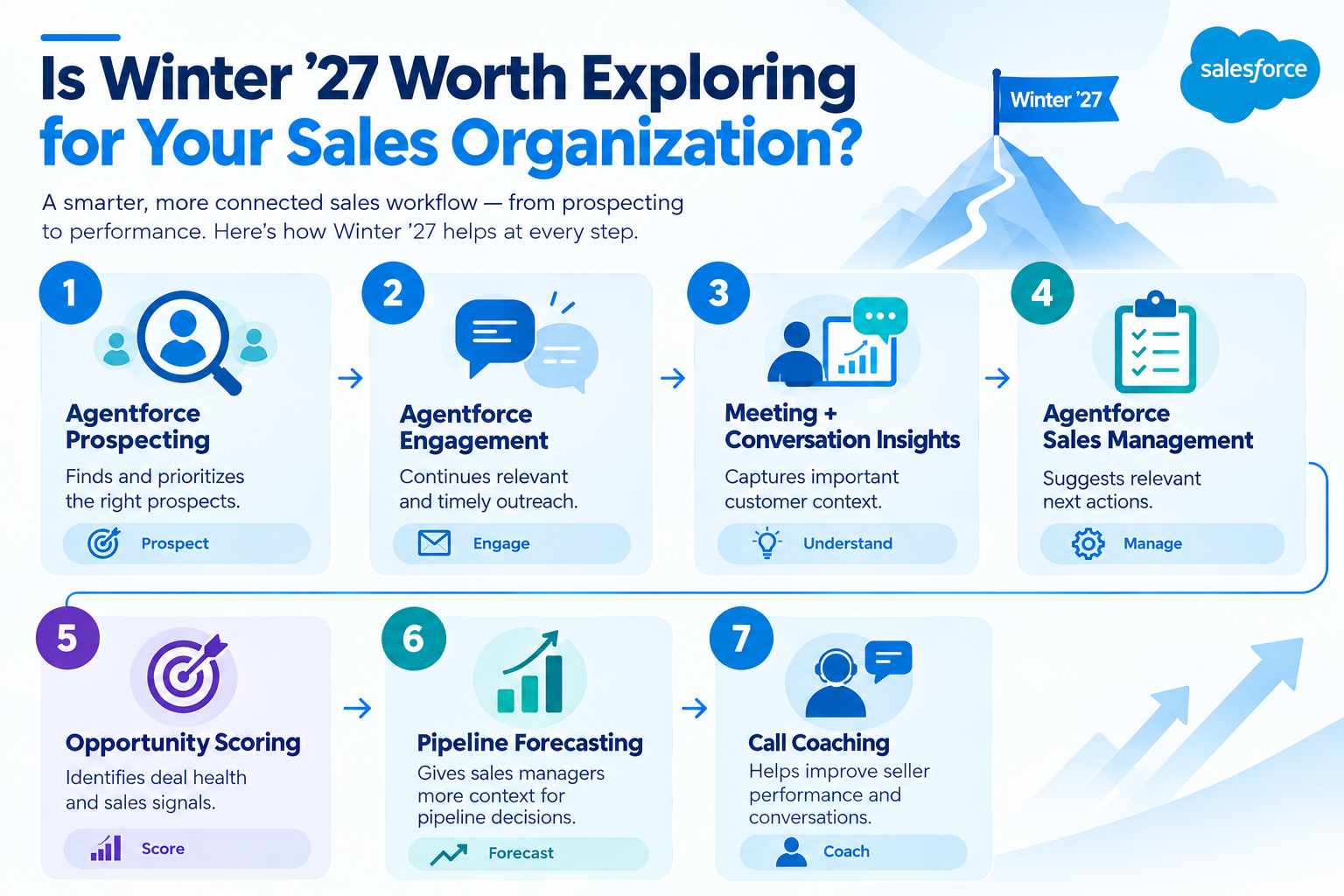
That creates a more connected sales workflow.
But it only works if the underlying Salesforce setup supports it.
How MV Clouds Can Help You Prepare for Agentforce Sales
For businesses evaluating Winter ’27, the first conversation shouldn't be:
“Which Agentforce license should we buy?”
It should be:
“Where can Agentforce create measurable value in our sales process?”
MV Clouds can help assess your existing Salesforce environment, identify suitable Agentforce use cases, and address the data, automation, integration, and process gaps that could limit the results.
Depending on your needs, this can include:
Salesforce consulting
Sales Cloud implementation and optimization
Agentforce readiness assessment
Agentforce implementation
Salesforce automation
Sales process customization
Salesforce integration
Data migration and cleanup
Custom Salesforce development
Salesforce health checks
Ongoing Salesforce support
The goal isn't to automate every sales activity.
It's to remove the work that prevents your salespeople from spending more time with customers.
Final Thoughts
Salesforce Winter ’27 shows a clear shift in how Agentforce can support sales teams. It is not just about answering questions or generating content. It can help sales teams find and prioritize prospects, manage follow-ups, identify pipeline risks, capture customer context, and support more consistent sales coaching.
But adopting these capabilities should not start with the question, “Which Agentforce feature should we enable?”
Start with the sales process.
Identify where your team is losing time, where important information is being missed, and where repetitive work is slowing down deals. Then determine which Agentforce capabilities can address those specific gaps.
Just as importantly, make sure your Salesforce data, processes, ownership rules, and governance are ready before introducing more automation.
Agentforce reduces unnecessary work so salespeople can spend more time selling, building relationships, and moving opportunities forward.
Ready to Explore Agentforce for Your Sales Team?
As a Salesforce consulting partner, MV Clouds can help you assess your Salesforce environment, identify practical Agentforce use cases, improve your sales processes, and prepare your organization for implementation.
Contact us for a free 30-minute Salesforce consulting consultation to discuss your sales challenges, automation opportunities, and Agentforce readiness.
→ Get Your Free 30-Minute Consultation
Frequently Asked Questions
1. What are the key Salesforce Winter ’27 updates for sales teams?
Salesforce Winter ’27 introduces updates across Agentforce Prospecting, Agentforce Engagement, Sales Workspace, Pipeline Management, Opportunity Scoring, Pipeline Forecasting, Call Coaching, Sales Engagement, and account management.
2. How can Agentforce Prospecting help sales teams find better leads?
Agentforce Prospecting can be scheduled to research prospects automatically and prioritize contacts based on recent engagement. This can help sales representatives focus first on prospects that match their criteria and have already shown interest.
3. How does Salesforce Winter ’27 improve sales follow-up?
Agentforce Sales Management can analyze meeting conversation transcripts and suggest follow-up actions, such as sending an email or scheduling another meeting. Sellers can review and approve these recommendations before taking action.
4. How can Salesforce Winter ’27 help sales managers identify at-risk opportunities?
Enhanced Opportunity Scoring can use conversation data and engagement signals alongside opportunity information to provide more context about deal health. Pipeline Forecasting also brings deal risks, methodology scores, contact insights, agent activity, and activity heatmaps into the forecasting process.
5. Can Salesforce identify customer issues that could put a sales opportunity at risk?
Yes, Salesforce Winter 27 can surface prioritized signals when an escalated open case is connected to an important opportunity or bookmarked account, helping sellers identify customer issues that may effect active deals.
6. How can Salesforce Winter ’27 improve sales forecasting?
Pipeline forecasting provides additional deal context, including deal risks, methodology scores, contact insights, agent activity, and activity heatmaps, helping sales leaders understand what is happening behind forecast numbers.
7. Can Salesforce Winter ’27 help managers improve sales coaching?
Yes. Call Coaching supports video calls for Einstein Conversation. Insights users and allows managers to evaluate sales conversations against defined competencies such as discovery, objection handling, competitive positioning, closing, and next-step confirmation.
8. Can businesses control when Agentforce-generated sales emails require human review?
Yes. Businesses can configure review requirements for all emails, initial outreach only, or specific situations based on record criteria. Custom Flow can also determine which messages require review.
9. Should businesses start with autonomous Agentforce actions?
For high-impact sales processes, the article recommends starting with AI recommendations. Teams can measure accuracy and seller feedback first, then introduce autonomous actions where they make business sense.
10. What should businesses measure after implementing Agentforce for Sales?
Businesses should measure outcomes such as reduced prospect research time, faster lead follow-up, higher meeting-to-opportunity conversion, better forecast accuracy, lower administrative workload, faster opportunity updates, and more consistent sales coaching.
