
Salesforce Revenue Cloud Migration in the USA: Process, Cost, and Timeline

Businesses using Salesforce CPQ are increasingly evaluating how their revenue operations should evolve as their product portfolios, pricing models, and customer expectations become more complex. Salesforce Revenue Cloud offers a broader approach to managing product catalogs, pricing, quoting, contracts, orders, and other revenue-related processes.
A Salesforce Revenue Cloud migration involves more than transferring existing CPQ records into a new system. It requires reviewing the current Salesforce environment, understanding how products and pricing are configured, evaluating integrations, planning data movement, and preparing teams for changes to their daily workflows.
For mid-sized and enterprise organizations based in the US, the right migration strategy depends on existing CPQ complexity, business requirements, data quality, integration dependencies, and long-term revenue goals.
Before making the move, businesses need to understand why Revenue Cloud (formerly known as "Agentforce Revenue Management") may be a better fit for their evolving revenue operations, what their existing CPQ environment requires, and how to approach the transition without disrupting ongoing business processes.
Why Are Businesses Considering Salesforce Revenue Cloud Migration?
Salesforce CPQ has traditionally helped sales teams configure products, calculate prices, manage discounts, and generate customer quotes. However, businesses with more complex revenue operations may need capabilities that go beyond quoting.
For example, a company selling software subscriptions may need to manage recurring contracts, renewals, usage-based charges, and customer upgrades. A manufacturing business may need to coordinate product configuration, pricing, order management, and service-related assets.
Managing these activities across disconnected applications can make it difficult to maintain consistent product and pricing information.
Revenue Cloud provides a broader approach to managing the quote-to-cash lifecycle, bringing together different revenue-related processes within a connected platform.
Depending on the products and licenses selected, its capabilities can include:
Product catalog and price management.
Product configuration and quoting.
Subscription and asset lifecycle management.
Contract and order management.
Usage-based selling and consumption management.
Invoicing and other billing-related capabilities through the applicable products.
The objective is to build a revenue architecture that supports the company's commercial processes, rather than managing each activity as a separate sales transaction.
Is Salesforce CPQ Being Discontinued?
Salesforce CPQ (Configure, Price, Quote) is in an end-of-sale phase, not an announced end-of-life phase. Salesforce has stated that existing customers can continue using their licenses, renewing them and receiving support. New product innovation is focused on Revenue Cloud.
However, there is an important distinction that existing customers should understand: Salesforce is no longer developing new features for the legacy CPQ managed package. Instead, its product innovation and investment are focused on its newer revenue management platform, Salesforce Revenue Cloud (formerly known as Revenue Lifecycle Management).
It does not mean that every organization using Salesforce CPQ must migrate immediately. Existing implementations can continue supporting business operations, but companies should evaluate whether their current CPQ setup can accommodate changing pricing models, subscription management, consumption-based pricing, and increasingly complex order management requirements.
For businesses with stable quoting processes, continuing with the existing CPQ implementation may remain a practical option. However, organizations planning to expand their revenue operations should start evaluating Salesforce Revenue Cloud, its capabilities, implementation requirements, and long-term suitability.
What Should You Evaluate Before Starting a Revenue Cloud Migration?
A migration should begin with an assessment of the existing Salesforce environment. Moving configurations without understanding how they support business operations can carry unnecessary complexity into the new architecture.
Before selecting a migration approach, review the following areas.
1. Existing Salesforce CPQ Configuration
Start by documenting how the current CPQ environment works.
Review:
Product bundles and product options.
Product rules and configuration attributes.
Price rules and discount schedules.
Quote templates and approval processes.
Contract and subscription records.
Amendments and renewal workflows.
Custom Apex, flows, and other automation.
The purpose is to identify which configurations are still required, which need redesign and which can be retired.
For example, a business may have accumulated several discount rules over time for different sales teams. Some may no longer reflect current commercial policies. Recreating all of them without review could make the new system harder to maintain.
2. Product and Pricing Complexity
Product catalog design is a significant part of Revenue Cloud planning.
Evaluate how products are organized, how prices are calculated, and whether the company uses different pricing models for different customer segments.
The following questions should be considered:
Are products sold individually or in configurable bundles?
How are prices affected by region, currency, and customer type?
Does the business offer volume-based or tiered discounts?
Are subscriptions billed monthly, annually, or according to usage?
Do sales representatives need approval for specific discount levels?
These requirements influence how the future product catalog and pricing architecture should be designed.
3. Data Quality and Migration Scope
CPQ does not necessarily require all records in the existing environment to be moved to the new one.
Review the quality and business relevance of:
Product and price records.
Customer and account information.
Quotes and quote lines.
Contracts and subscriptions.
Orders and order products.
Assets and amendment history.
Related custom records.
Decide which historical records must remain accessible, which active records must be migrated, and whether any information should be archived.
A clear definition of the migration scope helps manage project efforts and minimizes risks related to transferring outdated or duplicate data.
4. Integration Dependencies
Revenue processes often depend on systems outside Salesforce.
Common integration points include:
ERP and financial management systems.
Payment gateways and billing applications.
Tax calculation platforms.
E-commerce and customer portals.
Contract management applications.
Data warehouses and reporting platforms.
Third-party product and pricing systems.
Document what information each integration sends and receives, how frequently it runs, and which business processes depend on it.
A migration that changes product, quote, or order structures may also require integration updates. These dependencies should be identified before development begins.
How to Migrate Salesforce CPQ to Revenue Cloud: Step-by-Step Process
The Salesforce Revenue Cloud migration process should follow a structured sequence, beginning with business assessment and ending with post-deployment validation.
The following six stages provide a practical framework for planning the transition.
Step 1: Assess the Existing Salesforce CPQ Environment
The first stage is to understand the current system and establish what the business needs from the future platform.
The assessment should cover:
Existing Salesforce architecture and org strategy.
CPQ objects, fields, and relationships.
Product and pricing configurations.
Custom code and automation.
Active contracts, subscriptions, and assets.
External integrations.
User roles, permissions, and approval workflows.
The project team should also identify the business problems that the migration is expected to address.
For example, a software company may want to introduce consumption-based pricing while simplifying its existing subscription and renewal processes. A manufacturer may prioritize product configuration and order management.
These objectives help determine the migration scope.
Step 2: Select the Right Migration Strategy
There is no single migration strategy suitable for every Salesforce CPQ organization.
The choice depends on the complexity of the existing environment, business priorities, available resources, and willingness to redesign processes.
Two broad approaches illustrate the difference:
| Migration Approach | How It Works | Suitable Situation | Main Consideration |
|---|---|---|---|
| Lift-and-shift or functional-parity approach | Recreates the required existing CPQ functionality in Revenue Cloud with limited process redesign. | Organizations prioritizing continuity and a more controlled transition. | May carry forward unnecessary complexity. |
| Partial migration with targeted redesign | Moves selected product lines, processes, or capabilities while improving the future architecture. | Businesses that want to modernize specific revenue processes first. | Requires careful coexistence and scope management. |
It aims to recreate existing required functionalities in Revenue Cloud. However, configurations, data structures, and automation must be redesigned to align with the target platform's architecture.
A targeted migration can provide more flexibility, especially when the existing catalog or pricing logic needs rationalization. However, it requires decisions about which processes move first and how the systems operate during the transition.
The project team should select the strategy based on documented requirements rather than assuming that the fastest technical approach will produce the best long-term result.
Step 3: Redesign Product Catalog and Pricing Structures
Once the migration strategy is established, review how products and pricing should work in the new environment.
This stage may involve:
Organizing commercial and technical product information.
Reviewing product attributes and configuration options.
Defining product relationships and bundles.
Rebuilding pricing logic.
Reviewing discount rules and approval thresholds.
Defining subscription and usage-based selling requirements.
Mapping currencies and regional pricing requirements.
Consider a US-based technology company selling three subscription plans: Basic, Professional, and Enterprise.
Its existing CPQ implementation may use separate product records and pricing rules for each plan. During migration, the company could review whether the product catalog should be structured around shared product attributes, selling models, and pricing components.
The objective is not simply to reproduce the old configuration. It is to establish a product and pricing model that supports current commercial requirements and planned offerings.
Step 4: Plan Data Migration and Integrations
Data migration requires particular attention because Salesforce CPQ and Revenue Cloud do not use identical data structures.
The migration team must define how existing records and relationships map to the new architecture.
Typical activities include:
Identify the records required for migration.
Review source data quality and remove unnecessary duplicates.
Map existing CPQ objects and fields to the relevant Revenue Cloud structures.
Define transformation rules for records that do not have direct equivalents.
Prepare migration scripts and data-loading processes.
Validate record relationships and business-critical information.
Update integrations that depend on changed data structures.
Trial migrations to identify mapping.
For example, a quote-to-order workflow may depend on quote lines, product details, contract information, and downstream ERP records. If these relationships are not mapped correctly, users may encounter missing information or inconsistent order data after deployment.
Testing should cover more than record counts. The team should also validate whether the migrated information produces the correct business outcomes.
Step 5: Configure Revenue Cloud and Test Business Workflows
The implementation team configures Revenue Cloud based on the approved architecture and business requirements.
According to the project scope, these may be included:
Product catalog configuration.
Pricing and product configuration.
Quote and order workflows.
Contract and subscription processes.
Approval automation.
User permissions and access.
Integration services.
Reporting and operational visibility.
Testing should involve both technical teams and business users.
| Test Scenario | What Should Be Validated |
|---|---|
| Product Configuration | Products, bundles, and product options follow the required rules. |
| Pricing Calculation | Prices, discounts, and applicable adjustments are calculated correctly. |
| Quote Generation | Quotes contain accurate products, quantities, and commercial terms. |
| Approval Workflow | Required approvals are triggered according to business rules. |
| Contract and Order Processing | Relevant records and relationships are maintained. |
| Subscription Changes | Applicable amendments and renewal processes work as intended. |
| Integration Testing | Information moves correctly between Salesforce and connected systems. |
| User Access | Users can access the records and functions required for their roles. |
User acceptance testing is especially important. Sales, finance, operations, and customer-facing teams should verify that the system supports their actual responsibilities.
Step 6: Deploy, Train Users, and Monitor the New Environment
Before production deployment, finalize the cutover plan.
This plan should define:
The production deployment sequence.
Data migration and validation windows.
Integration activation.
User access and permissions.
Business communication.
Rollback and contingency procedures.
Post-launch support responsibilities.
If Salesforce CPQ and Revenue Cloud will operate in parallel during the transition, define which system is authoritative for each process and how users should handle transactions across both environments.
User training should be role-specific. Sales representatives may need guidance on product configuration and quoting, while finance and operations teams may need training on contracts, orders, and related processes.
After go-live, monitor:
Quote and order processing.
Pricing and discount accuracy.
Integration errors.
Data consistency.
User adoption.
Workflow exceptions and support requests.
How Much Does Salesforce Revenue Cloud Migration Cost in the USA?
The cost of a Salesforce Revenue Cloud migration depends on the required licenses, implementation scope, existing CPQ complexity, data migration effort, integrations, and level of customization.
There is no universal migration price that applies to every organization.
It is useful to separate the investment into two categories: Salesforce licensing and implementation services.
Salesforce Revenue Cloud Licensing
Salesforce publishes list pricing for Revenue Cloud editions. Its published pricing page currently lists the following annual-billing prices:
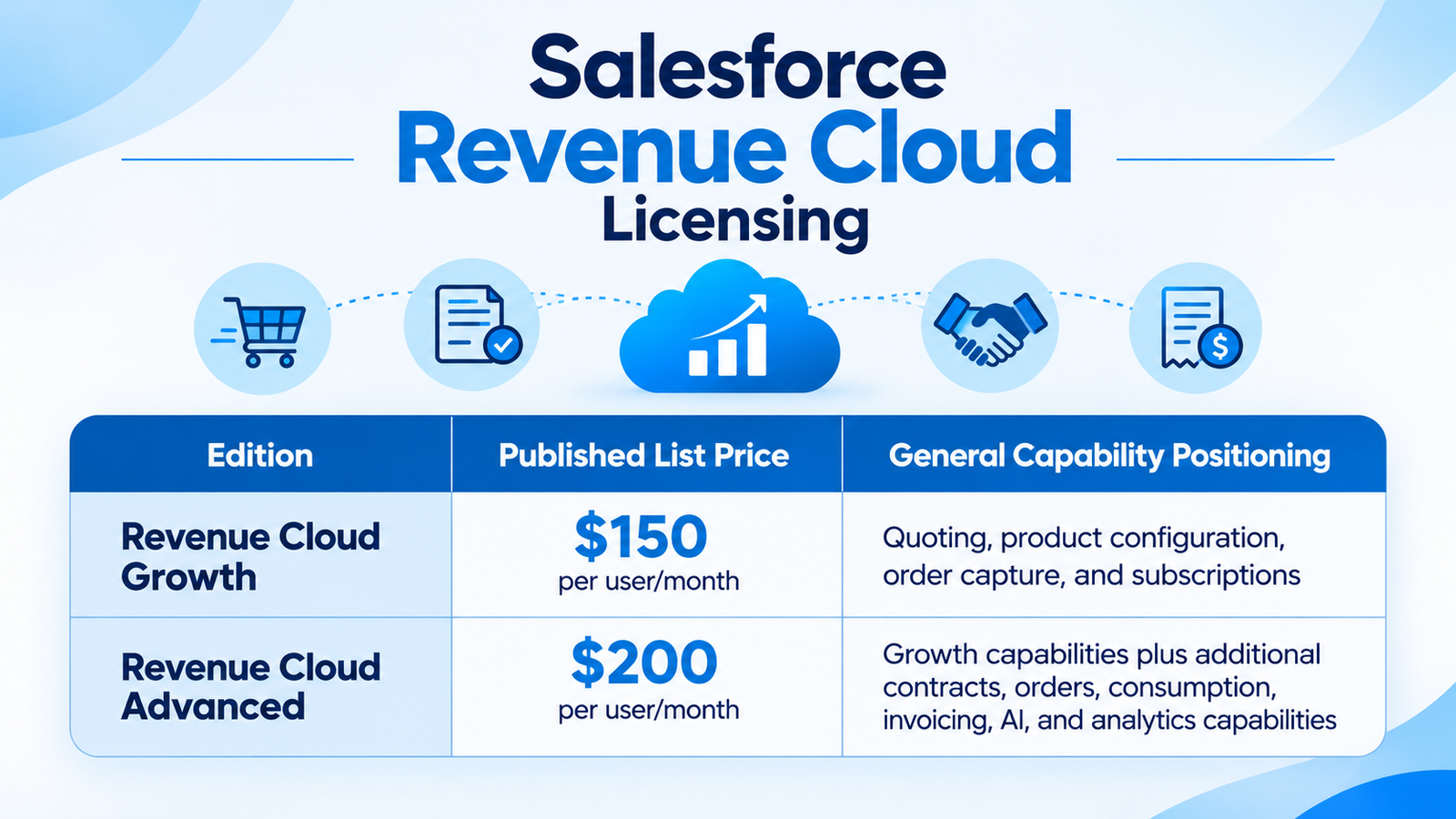
Salesforce Revenue Cloud Migration Cost: Key Factors and Budget Planning
Implementation services are separate from Salesforce subscription fees.
The cost of Salesforce Revenue Cloud migration services is influenced by several factors:
Complexity of the existing CRM system.
Volume and quality of data to be migrated.
Number of integrations with existing business applications.
Customization and automation requirements.
Number of users and business departments involved.
Testing, training, and post-migration support.
| Cost Factor | Why It Affects Project Cost |
|---|---|
| Existing CPQ Complexity | Extensive custom logic, product rules, and pricing configurations require additional assessment and redesign. |
| Product Catalog Size | Large or complicated catalogs increase mapping, configuration, and validation effort. |
| Data Migration Scope | Historical records, active subscriptions, contracts, and complex relationships add migration work. |
| Integration Requirements | ERP, billing, payment, and external application integrations require development and testing. |
| Customization | Custom workflows, automation, and business-specific requirements affect implementation effort. |
| Testing Requirements | Complex revenue operations require broader scenario testing and business validation. |
| Training and Change Management | Multiple teams, roles, and locations may require additional training and support. |
How Can Businesses Estimate Their Migration Budget?
A practical way to begin is to break the project into workstreams.
Illustrative budget-planning formula:
Total project investment = Salesforce licensing + migration assessment + solution design + configuration and development + data migration + integration work + testing + training and deployment support.
For example, a company with a relatively simple CPQ setup may need limited catalog redesign and a small number of integrations. Another organization may have multiple business units, complex subscription models, custom pricing rules, and ERP dependencies.
Even if both companies use Salesforce CPQ, their implementation costs can differ considerably.
Before requesting a formal project estimate, prepare:
Current Salesforce CPQ architecture documentation.
Product catalog and pricing details.
A list of active integrations.
Data migration requirements.
Required business workflows.
Expected users and licensing needs.
Target deployment period.
This information helps a consulting partner assess the actual scope instead of providing a generic estimate.
How Long Does a Salesforce Revenue Cloud Migration Take?
A Salesforce Revenue Cloud migration timeline depends on the complexity of the current CPQ environment and the scope of the new implementation.
A project involving a limited product catalog and few integrations will generally require less effort than one involving multiple business units, complex pricing logic, extensive custom development, and large transactional datasets.
Rather than treating one duration as a guarantee, organizations should plan around project phases and their dependencies.
Key Phases in the Migration Timeline
| Project Phase | Main Activities | What Can Affect the Duration |
|---|---|---|
| Discovery and Assessment | Review CPQ configuration, business requirements, and dependencies. | Documentation quality and stakeholder availability. |
| Solution Design | Define architecture, migration strategy, and product/pricing model. | Complexity of commercial processes. |
| Configuration and Development | Configure Revenue Cloud and implement required workflows. | Customization and integration scope. |
| Data Migration | Map, transform, load, and validate records. | Data volume, quality, and relationships. |
| Testing and UAT | Validate business scenarios and resolve issues. | Number of workflows and user groups. |
| Deployment and Stabilization | Cutover, training, monitoring, and support. | Business readiness and deployment dependencies. |
Salesforce Revenue Cloud Consulting and Migration Services by MV Clouds
A successful Salesforce Revenue Cloud migration requires more than technical configuration. Businesses need to evaluate their existing CPQ environment, product catalog, pricing models, data structures, integrations, and quote-to-cash workflows before defining the implementation approach.
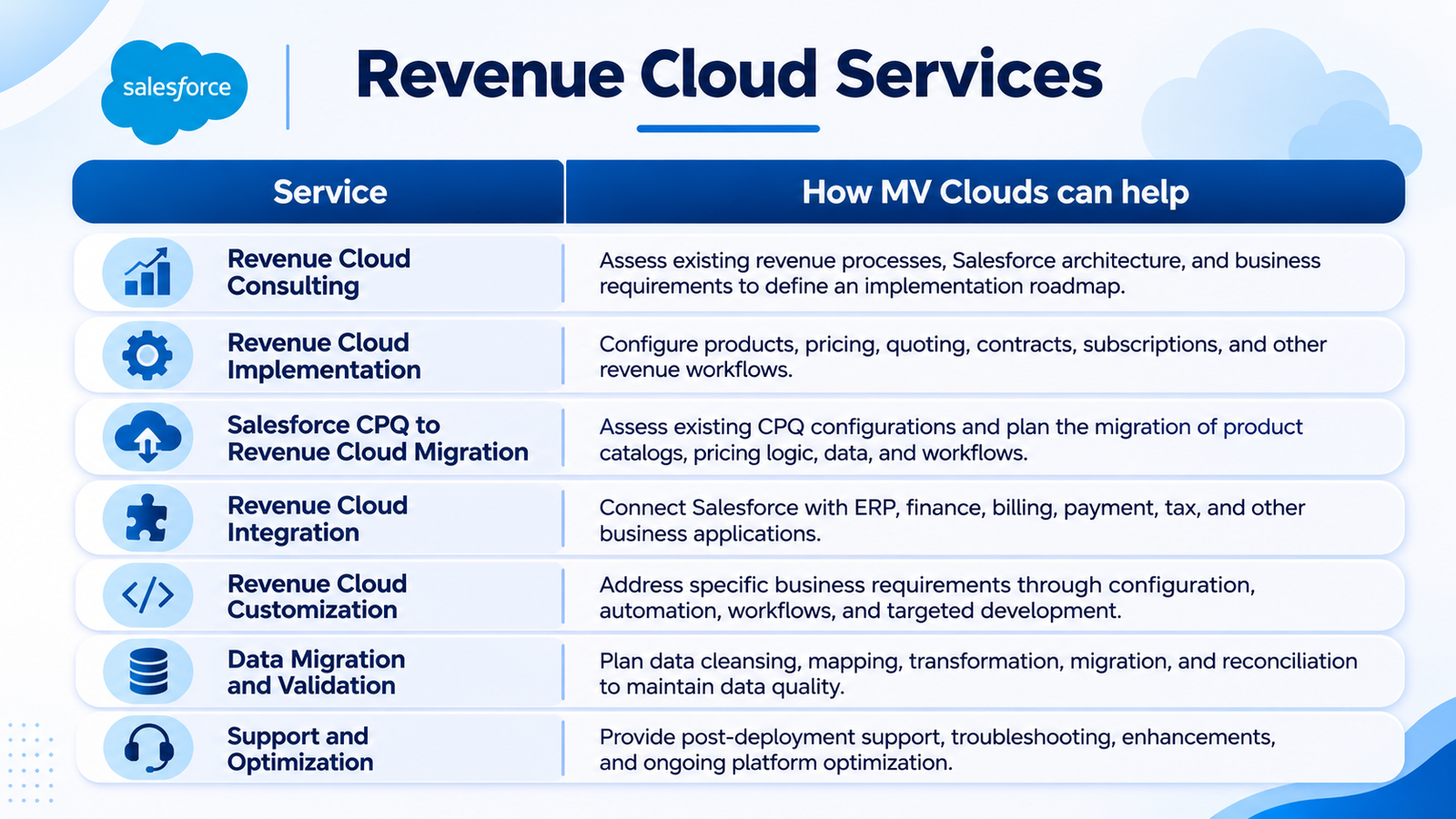
MV Clouds provides Salesforce Revenue Cloud consulting, implementation, and migration services to help businesses plan and manage these requirements.
Our services cover different stages of the revenue lifecycle:
Why Consider MV Clouds for Your Revenue Cloud Project?
The right implementation partner should understand how revenue processes connect across sales, finance, and operations.
MV Clouds takes a business-first approach to Salesforce Revenue Cloud projects, considering:
Existing Salesforce architecture: Understand the current environment before recommending changes.
Product and pricing requirements: Review product structures, pricing rules, discounts and quoting workflows.
Data and integration dependencies: Identify the records and connected systems involved in the revenue lifecycle.
Implementation planning: Define the required configuration, development, testing and deployment activities.
Long-term support: Consider how the solution will accommodate future products, pricing models, and operational requirements.
Explore MV Clouds' Salesforce Revenue Cloud Services to learn more about our consulting, implementation, migration, integration, and support capabilities.
Final Thoughts
Salesforce Revenue Cloud migration is an opportunity to review how an organization manages product information, pricing, quoting, contracts, orders, and other revenue processes.
For existing Salesforce CPQ customers, migration planning should begin with a clear understanding of the current implementation and future business requirements. Product catalog complexity, pricing logic, data relationships, integrations, and user readiness all influence the project's scope, cost, and timeline.
A structured assessment helps decision-makers choose an appropriate migration strategy, prepare a realistic budget, and reduce avoidable implementation risks.
Planning a Salesforce Revenue Cloud migration in the USA?
MV Clouds can help assess your existing Salesforce environment, identify migration requirements, and plan an implementation approach aligned with your business operations.
Contact us at MV Clouds today.
Frequently Asked Questions About Salesforce Revenue Cloud Migration
1. What is Salesforce Revenue Cloud migration?
Salesforce Revenue Cloud migration is the process of transitioning from an existing Salesforce CPQ or revenue management setup to the Revenue Cloud platform and its applicable capabilities. It involves reviewing the existing architecture, redesigning required configurations, migrating relevant data, updating integrations, and testing business workflows.
2. How do I migrate Salesforce CPQ to Revenue Cloud?
Start by assessing your current CPQ environment, including product catalogs, pricing rules, customizations, data, and integrations. Then select a migration strategy, design the target architecture, configure Revenue Cloud, migrate and validate the required records, test business workflows, and prepare for deployment.
3. Is Salesforce CPQ being discontinued?
Salesforce CPQ is in an end-of-sale phase, not an announced end-of-life phase. Existing customers can continue using and renewing their licenses and receiving support. Salesforce has shifted new product innovation toward Revenue Cloud, but existing CPQ customers are not subject to a forced immediate migration.
4. Is Salesforce Revenue Cloud the same as Salesforce CPQ?
No. Salesforce CPQ is a managed-package solution focused on product configuration, pricing, and quoting. Revenue Cloud uses a different platform architecture and extends these capabilities to include contract, order, billing, and broader revenue lifecycle management.
Salesforce briefly renamed the platform Agentforce Revenue Management before reverting to Revenue Cloud in September 2026.
5. How much does Salesforce Revenue Cloud migration cost in the USA?
The cost of Salesforce Revenue Cloud migration depends on licensing, existing CPQ complexity, product catalog size, data migration, integrations, customization, and testing requirements.
Salesforce's published list pricing currently shows:
Revenue Cloud Growth: $150/user/month.
Revenue Cloud Advanced: $200/user/month.
Both plans are billed annually. These prices cover software licensing, not implementation or migration services. Additional products, such as Revenue Cloud Billing or Salesforce Spiff, may require separate licenses.
Businesses should request an implementation estimate based on their existing Salesforce CPQ environment and migration requirements.
6. How long does a Salesforce Revenue Cloud migration take?
The timeline depends on the existing CPQ configuration, business requirements, data quality, integrations, and testing scope. A project with limited customization may require less work than a multi-business-unit implementation with complex pricing and extensive integrations. A discovery assessment is necessary to establish a realistic schedule.
7. Can Salesforce CPQ and Revenue Cloud operate at the same time during migration?
Yes, Salesforce documentation describes coexistence between Salesforce CPQ and Revenue Management when the required products are provisioned. However, organizations must plan how transactions, data ownership, integrations, and user responsibilities will work during the transition.
8. What data should be migrated from Salesforce CPQ to Revenue Cloud?
The required data depends on the organization's migration scope. It may include product and price information, active quotes, quote lines, contracts, subscriptions, orders, assets, and relevant historical records. The team should define which records need to move, which should remain accessible in the existing system and how relationships will be maintained.
9. What are the biggest challenges in Salesforce CPQ to Revenue Cloud migration?
Common challenges include differences in data architecture, complex product and pricing rules, custom automation, integration dependencies, and user adoption. Addressing these areas during discovery and solution design can reduce implementation risks.
10. What should I look for in a Salesforce Revenue Cloud migration partner in the USA?
Look for experience in Salesforce CPQ assessment, Revenue Cloud architecture, data migration, product and pricing configuration, integration development, and deployment planning. The partner should also understand your business processes and provide clear project scope, deliverables, testing plans, and post-launch support.
