
Salesforce NPSP to Nonprofit Cloud Migration in the USA: A Complete Guide

Salesforce Nonprofit Cloud migration helps U.S. nonprofit organizations evaluate their existing Nonprofit Success Pack (NPSP) environment and transition to Salesforce's newer nonprofit-focused platform when it better supports their operational needs. The process involves more than moving donor records. It requires reviewing fundraising workflows, data structures, integrations, financial reporting, security requirements, and staff readiness.
For nonprofit CEOs, COOs, CFOs, development directors, and Salesforce administrators, the decision to migrate should be based on business requirements rather than the assumption that every organization needs a new platform.
A pre-planned migration can allow organizations to re-evaluate donor management, fundraising operations, program reporting and data management. However, the benefits rely on the organization's needs, implementation strategy, and the ability to adapt to the new system.
This guide explains how Salesforce Nonprofit Cloud migration works, when U.S. nonprofits should consider it, the migration steps involved, implementation cost factors, common challenges, and how to select a Salesforce Nonprofit Cloud implementation partner.
What Is Salesforce Nonprofit Cloud Migration?
Salesforce NPSP to Agentforce Nonprofit migration is the process of moving an organization's Salesforce environment from the Nonprofit Success Pack (NPSP) to Agentforce Nonprofit (formerly Nonprofit Cloud). Depending on the organization's requirements, this can involve transferring donor and fundraising data, adapting customizations, configuring new workflows, updating integrations, and rebuilding reports.
The Nonprofit Success Pack (NPSP) is a free, open-source managed package built on Salesforce CRM. It helps nonprofit organizations manage constituent relationships, household accounts, donations, recurring gifts, and fundraising activities within Salesforce.
Salesforce's Agentforce Nonprofit (formerly known as Nonprofit Cloud) is a platform developed specifically to handle more complex nonprofit operations. It provides more than fundraising and constituent management; it delivers native program and case management, grantmaking management, outcome tracking, and volunteer management features. These tools allow nonprofits to more holistically manage fundraising, service delivery, grant distribution, and program performance in Salesforce. Availability of features depends on the products, editions and configurations selected.
Migrating to a new system requires both technical and operational planning, including:
Maintaining accurate donor and fundraising records.
Preserving relevant donation histories and campaign attribution.
Reviewing recurring-gift processes and payment integrations.
Supporting grant reporting and program outcome measurement.
Maintaining appropriate access controls for donor information.
Preparing fundraising and finance teams for workflow changes.
Minimizing disruption during important fundraising and reporting periods.
The aim is not simply to transfer existing records. It is to make sure the target Salesforce environment supports the organization's current operations and future priorities.
Is Salesforce Retiring the NPSP?
No. Salesforce has not announced an end-of-life date for the Nonprofit Success Pack (NPSP). Existing NPSP implementations can continue operating. However, Salesforce ended new feature development for NPSP in March 2023 and is directing its nonprofit product innovation toward Agentforce Nonprofit (formerly Nonprofit Cloud).
Non-profit organizations do not need to migrate immediately. For those looking to expand their Salesforce capabilities, Agentforce Nonprofit offers native program and case management, grantmaking management, and outcome management features. Long-term operational requirements, data architecture, and integrations should all be considered before making a decision.
Why Are U.S. Nonprofits Considering a Move from NPSP to Agentforce Nonprofit Cloud?
The decision to migrate often starts when nonprofit leaders identify limitations in their existing Salesforce environment or plan a broader operational improvement.
Not every organization needs to move. However, evaluating Nonprofit Cloud may be worthwhile when the current system no longer aligns with the organization's requirements.
1. Improving Donor and Fundraising Management
U.S. nonprofits may manage individual contributions, major gifts, corporate sponsorships, recurring donations, and fundraising campaigns through different workflows.
When donor information is spread across multiple systems or custom solutions, staff may struggle to maintain a consistent view of donor relationships and giving activity.
A migration assessment can help determine whether the target platform can better support the organization's fundraising processes and reporting needs.
2. Connecting Fundraising with Program Outcomes
Many nonprofits need to understand not only how much funding they receive but also how their programs use resources and deliver results.
If your organization manages fundraising and program information separately, you might want to consider evaluating Nonprofit Cloud to see if it can support your constituent relationships, program participation, and reporting needs.
The suitability of this approach depends on the organization's selected products, configuration, and reporting requirements.
3. Reviewing Legacy Customizations
An NPSP environment may contain years of custom fields, Salesforce flows, Apex code, third-party applications, and specialized reports.
Some customizations may still be essential, while others may no longer serve a clear purpose.
Migration provides an opportunity to assess these dependencies, retire unnecessary components, and determine which capabilities need to be rebuilt in the target environment.
4. Supporting Organizational Growth
A growing nonprofit may expand its donor base, fundraising programs, staff, volunteer activities, or geographical reach. Salesforce configurations may need to be re-evaluated if they become difficult to maintain or adapt.
Nonprofit Cloud should be analyzed to determine whether it addresses specific operational gaps and whether expected benefits justify implementation costs.
5. Strengthening Data Governance
Donor records, giving histories, contact information, and financial information require appropriate handling.
A migration project provides an opportunity to review data access, retention policies, integration permissions, and administrative controls. However, moving to a different platform does not automatically make an organization compliant with applicable laws or internal policies.
NPSP to Nonprofit Cloud Migration Process
A successful migration requires coordination between nonprofit leadership, fundraising and finance teams, Salesforce administrators, and technical implementation specialists.
The following process provides a structured approach for U.S. nonprofit organizations.
Step 1: Assess Your Existing Salesforce Environment
Begin with a detailed review of your NPSP implementation. Document the Salesforce objects, records, customizations, integrations, reports, permissions, and business processes currently in use.
Your assessment should include:
Donor, contact, household, and organizational records.
Donations, recurring gifts, campaigns, and fundraising history.
Grant-related information and program records, where applicable.
Custom fields, objects, flows, Apex code, and validation rules.
Payment processors, email platforms, and external applications.
Reports and dashboards used by fundraising and finance teams.
User permissions, sharing rules, and access requirements.
For example, the Salesforce system manages donors, a separate payment processor handles online donations, and an automated gift acknowledgment process is in place. Before designing the target environment, the migration team must understand how these systems interact.
Deliverable: An assessment documenting the existing architecture, technical dependencies, business requirements, and migration risks.
Step 2: Define Business Requirements and Migration Goals
Identify what the organization expects to improve through migration.
Requirements should come from the people who use Salesforce, not only the IT team.
Key stakeholders may include:
Executive leadership responsible for strategic priorities.
Development directors managing fundraising programs.
Fundraisers responsible for donor relationships.
Finance teams handling donation reconciliation and reporting.
Program managers tracking services and outcomes.
Salesforce administrators managing data, automation, and access.
Prioritize requirements as must-have, should-have, and future-phase capabilities.
For example, an organization may identify accurate recurring-gift reporting as a must-have, redesigned executive dashboards as a should-have, and additional program analytics as a future improvement.
Deliverable: An approved migration scope with measurable acceptance criteria and clearly defined priorities.
Step 3: Map NPSP Data to Nonprofit Cloud
Data mapping is one of the most important parts of Salesforce Nonprofit Cloud migration because the source and target environments may structure information differently.
Create a source-to-target mapping document for each relevant record type.
| Existing Information | What to Validate During Migration |
|---|---|
| Contacts and household accounts | Constituent mapping, household relationships, and duplicate handling |
| Donation opportunities | Target fundraising records, donation history, and reporting treatment |
| Recurring donations | Target functionality, payment dependencies, and recurring-gift history |
| Campaigns | Campaign history, attribution, and fundraising reporting |
| Custom objects and fields | Whether to retain, transform, replace, or retire them |
| Activities and interaction history | Which historical records must remain accessible? |
| Program records | Target structures, relationships, and outcome reporting requirements |
| Reports and dashboards | Field mappings, calculations, filters, and report definitions |
Validate the mapping against the organization's actual configuration and the target platform's supported data structures.
Do not assume every record, relationship, or customization can be transferred unchanged.
Deliverable: A validated mapping document, including transformation rules, dependencies, and exception handling.
Step 4: Clean and Prepare Your Data
Data quality problems can affect donor communication, fundraising reports, and operational decisions after migration.
Before transferring records, identify and address:
Duplicate donor and constituent records.
Incomplete or inconsistent contact information.
Incorrect household and organizational relationships.
Donation records with missing or inconsistent values.
Outdated custom fields and obsolete records.
Inconsistent campaign attribution.
Historical records that require special retention or access treatment.
Establish data ownership and obtain approval for important cleanup decisions.
For example, if the same donor has multiple records, determine whether the records should be merged or retained separately based on the organization's data model and business requirements.
For U.S. nonprofits, review applicable donor privacy commitments, retention requirements, and internal data governance policies before deleting or transforming historical information.
Deliverable: Cleaned source data, documented transformation rules, and a baseline for migration reconciliation.
Step 5: Design and Configure Nonprofit Cloud
Configure the target environment around approved business requirements rather than automatically reproducing every legacy NPSP customization.
Depending on the scope, configuration may include:
Constituent and fundraising processes.
Donation and recurring-gift workflows.
Program management and outcome tracking.
Volunteer management.
User roles, permission sets, and sharing rules.
Approval processes and automation.
Reports and dashboards.
External applications and API connections.
Determine which existing processes can be simplified, which need to be rebuilt, and which require alternative solutions.
This stage should also include a review of how users will access sensitive records and how integrations will exchange data.
Deliverable: A configured target environment that is ready for migration testing.
Step 6: Migrate Data and Update Integrations
Execute the migration using a documented plan that accounts for record dependencies, data volume, integration requirements, and acceptable downtime.
The process generally includes:
Extracting the approved source records.
Transforming data according to the validated mapping.
Loading records in the correct dependency order.
Preserving required relationships and historical information.
Updating integrations and API connections where necessary.
Recording and resolving failed data loads.
Reconciling source and target records and key financial totals.
Run migration rehearsals in a suitable test environment before production cutover.
For organizations that process online donations, confirm how payment transactions, recurring-gift schedules, and related integrations will operate during the transition. Avoid assuming that payment credentials or recurring payment arrangements can be transferred without provider-specific requirements.
Deliverable: A tested migration process with documented reconciliation results and an issue-resolution plan.
Step 7: Test Fundraising, Reporting, and Security
Successful data loading does not guarantee that the new environment supports the organization's daily operations.
Conduct user acceptance testing using real business scenarios.
For example, test whether a fundraiser can review a donor's giving history, record a new donation, associate it with the correct campaign, and generate the reports needed by management.
Testing should cover:
Donor and constituent record accuracy.
Donation history and recurring-gift workflows.
Campaign attribution and fundraising reports.
Finance-related reconciliation requirements.
Gift acknowledgment and approval processes.
External application integrations.
Program records and outcome reporting, where applicable.
User permissions and access restrictions.
Error handling and automated workflows.
Compare key reports and financial totals against approved source-system baselines. Investigate discrepancies before approving production deployment.
Deliverable: Documented test results, resolved critical defects, and business-owner approval.
Step 8: Plan Go-Live Around U.S. Fundraising Operations
Migration timing matters because nonprofit teams may have fixed fundraising campaigns, grant deadlines, financial close periods, and year-end giving activities.
For U.S. organizations, the final deployment schedule should account for these operational commitments rather than follow a generic implementation calendar.
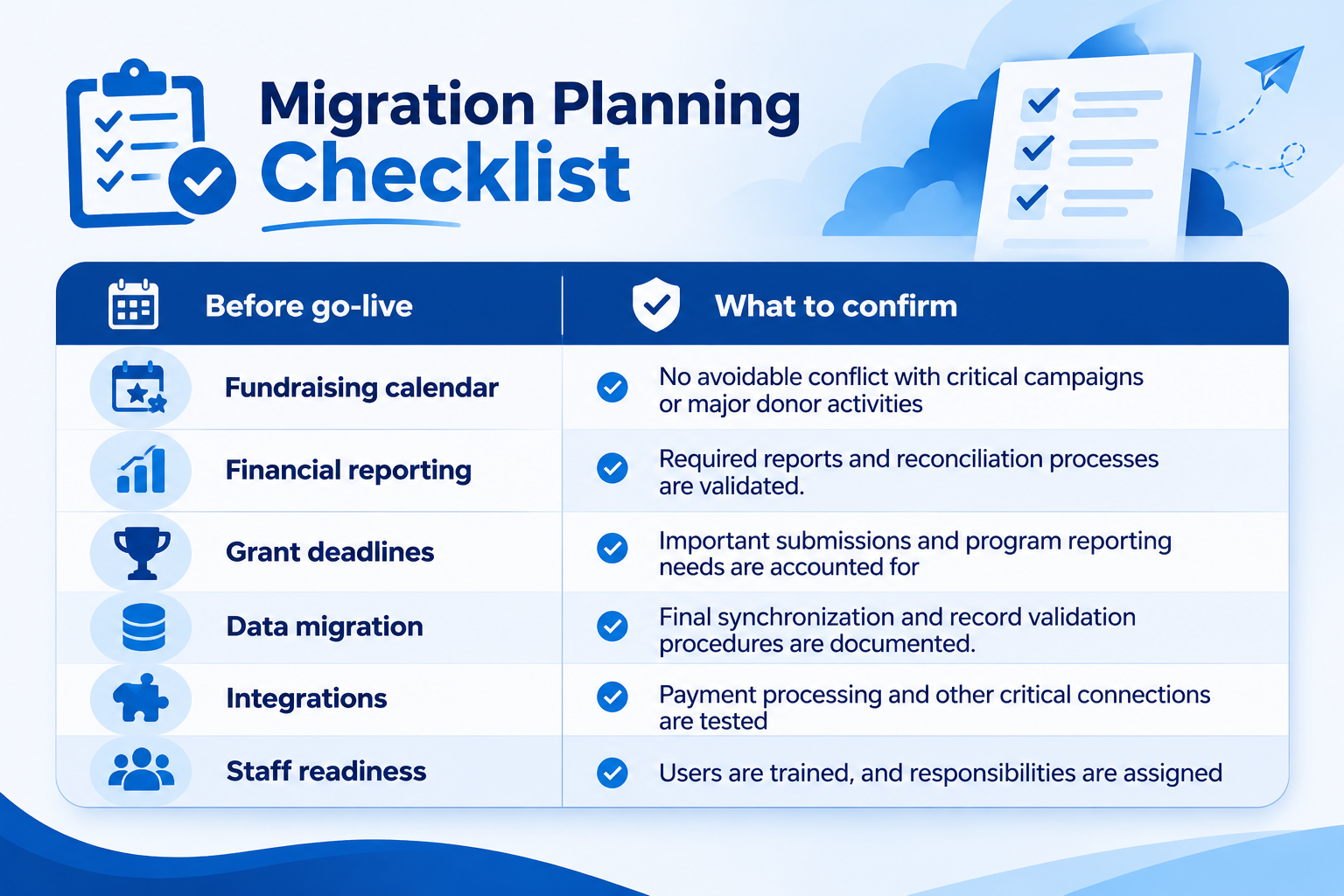
Before go-live:
Confirm the cutover date and responsibilities.
Plan any necessary data freeze or final synchronization.
Communicate workflow changes to employees.
Train fundraising, finance, program, and administrative teams.
Confirm backup and contingency arrangements.
Establish procedures for handling urgent issues.
Validate integrations and key reports immediately after deployment.
Avoid scheduling a major transition during a critical fundraising period unless the organization has assessed the risks and established appropriate safeguards.
Deliverable: An approved cutover plan, trained users, and a documented support process.
Step 9: Monitor Performance and Optimize
After go-live, monitor the system to confirm that the migration has achieved its intended objectives.
Review:
Data quality and unresolved migration errors.
Donation and fundraising report accuracy.
Integration performance.
User adoption and training gaps.
Automation failures and support requests.
Access controls and administrative processes.
Use the findings to prioritize improvements. A post-migration review can also identify legacy customizations that are no longer needed and opportunities to reduce administrative effort.
Deliverable: A post-launch improvement plan based on actual operational results.
Salesforce Nonprofit Cloud Migration Challenges for U.S. Organizations
Moving from Salesforce Nonprofit Success Pack (NPSP) to Nonprofit Cloud involves more than transferring donor records. U.S. nonprofits must evaluate existing fundraising processes, data relationships, integrations, reporting requirements, and staff readiness before moving to the new environment.
An unplanned migration can cause trouble, resulting in disruptions in donation processing, delays in financial reporting, and inconsistencies in data. By identifying these challenges early, organizations are able to control project costs, protect fundraising operations, and plan a more reliable transition.
Data Model Differences: Match records and relationships in NPSP to the appropriate data model in Nonprofit Cloud.
Donor Data Quality: Make sure that duplicate or incomplete records are removed, and historical donation data is validated before the migration begins.
Customization Compatibility: Review and adapt existing workflows, automations, and reports to ensure they are customizable.
Integration Issues: Test connections with donation platforms, accounting tools, and marketing applications.
Fundraising Disruptions: Plan migration around fundraising campaigns, donation processing, and financial reporting deadlines.
Staff Adoption: Train fundraising, finance, and operations teams on updated workflows and processes.
Budget Overruns: Define project scope, deliverables, and potential additional costs before implementation.
Data Security: Protect donor information and review user permissions and privacy requirements.
Working with an experienced Salesforce Nonprofit Cloud implementation partner can help an organization identify technical dependencies, prioritize critical fundraising workflows, and develop a migration roadmap that reflects its operational needs.
Salesforce Nonprofit Cloud Migration Costs in the USA
The cost of Salesforce Nonprofit Cloud migration in the USA depends on the nonprofit's existing Salesforce environment, the amount and quality of its data, required integrations, and the level of customization involved. A small organization with straightforward donor records may need a simpler implementation than a large nonprofit managing complex fundraising workflows, grant reporting, multiple payment systems, and legacy integrations.
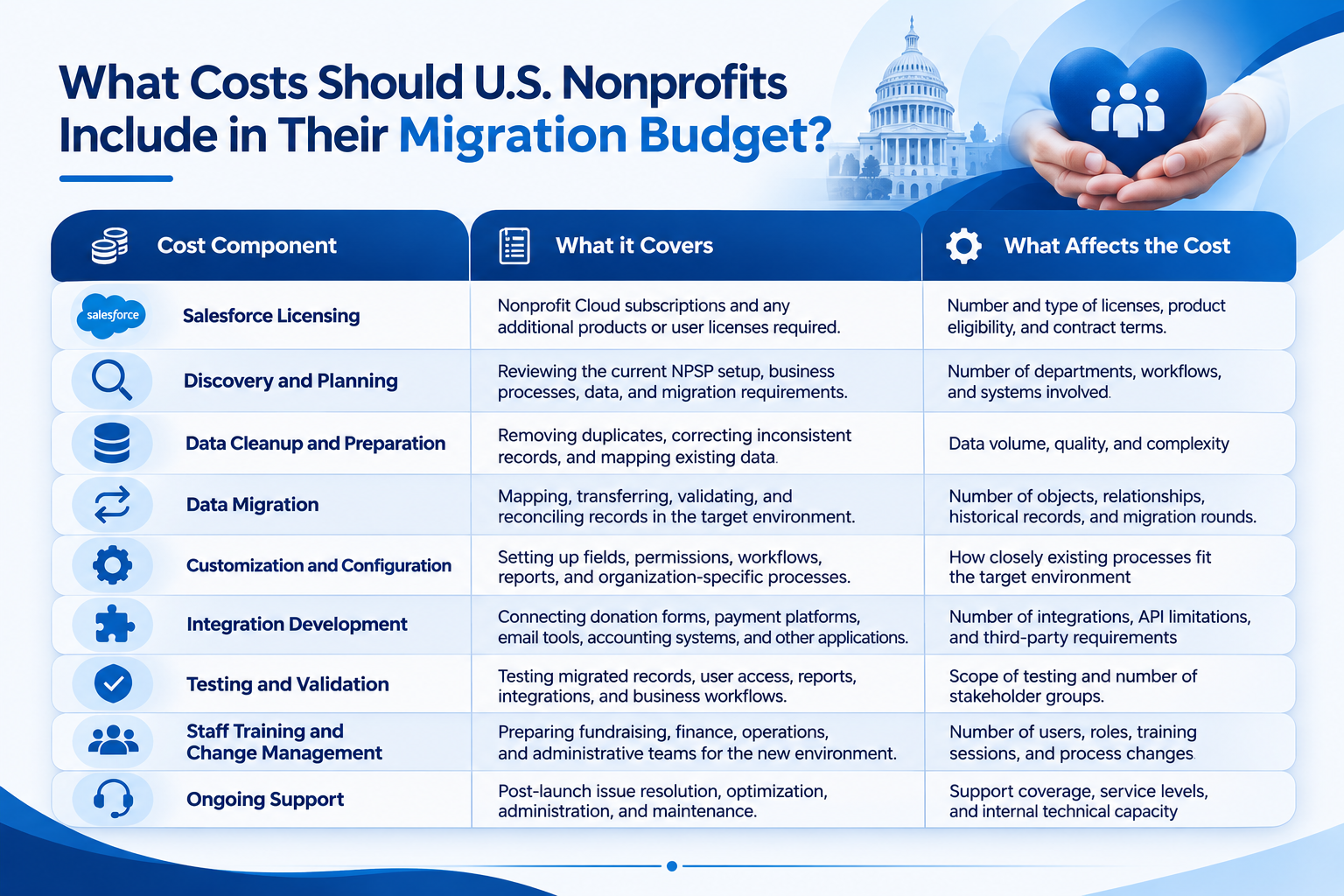
These costs may be included in a single implementation proposal or quoted separately. Ask vendors to identify what is included, what is optional, and what could become an additional charge.
How Can a Nonprofit Estimate Its Migration Budget?
Start by preparing an inventory of:
The number and types of records to migrate.
Existing custom objects, fields, automation, and reports.
Integrations that must continue working after migration.
Historical data that must remain available.
Target platform capabilities required at launch.
Training, support, and post-launch requirements.
Then request a scoped proposal from qualified implementation partners.
The proposal should identify deliverables, assumptions, exclusions, milestones, responsibilities, testing requirements, and any potential additional costs.
A lower initial estimate may not represent the best value if important migration activities, integration work, or post-launch support are excluded.
Key takeaway: The best migration date is not simply the earliest available date. It is the date that gives your nonprofit sufficient time to validate data, test critical workflows, prepare employees, and protect important fundraising and financial activities.
Working with a Salesforce Nonprofit Cloud implementation partner can help your organization coordinate the migration schedule, identify operational risks, and develop a cutover plan aligned with its fundraising calendar and reporting responsibilities.
How to Plan Salesforce Nonprofit Cloud Migration Around U.S. Fundraising and Financial Reporting Cycles
Salesforce Nonprofit Cloud migrations should be scheduled around fundraising campaigns, year-end giving deadlines, grant reporting deadlines, and financial close periods for U.S. organizations. Migrating at a bad time can disrupt donor communications, delay donation processing, or add additional work to fundraising and finance teams.
Management should review their annual operating calendar to select a go-live date and identify periods when Salesforce availability and accurate reporting are important.
1. Avoid Critical Fundraising Periods
Many U.S. nonprofits experience increased fundraising activity during year-end giving campaigns, including the holiday season and December 31. Other organizations have important annual appeals, GivingTuesday campaigns, or fundraising events throughout the year.
Plan migration around these activities wherever possible.
Review upcoming fundraising campaigns and major donor outreach schedules.
Identify periods when donation volumes or donor communications are expected to increase.
Avoid major production changes immediately before important campaigns.
Confirm that donation forms, payment integrations, campaign tracking, and acknowledgment workflows will function correctly after migration.
Example: If a nonprofit is preparing for its year-end giving campaign, it may schedule migration earlier in the year, allowing time for testing and user training before the campaign begins.
2. Coordinate Migration With Financial Reporting and Grant Deadlines
Finance teams need reliable donor records, reconciliation reports, and financial data for internal reporting and other applicable reporting obligations. Nonprofits receiving grants may also have scheduled reporting deadlines tied to funding agreements.
Coordinate with finance and program leaders before migration to identify:
Monthly, quarterly, and annual financial close dates.
Financial reporting schedules and donation calculations.
Timelines for grant submissions and reporting of program outcomes.
Outstanding donations, refunds, and payment transactions.
Reports that must remain accessible during the transition.
Validate key financial totals and report outputs before and after migration. Any differences should be investigated and resolved before business owners approve the new environment.
3. Establish a Data Freeze and Final Synchronization Plan
The purpose of a data freeze is to help maintain consistency during migrations by restricting changes to selected records or systems. The exact approach depends on the migration method and the organization's operational requirements.
A practical cutover plan should define:
Which records and transactions are included in the final migration.
When users must stop making changes to affected records, if required.
How new donations and donor updates will be handled during the transition.
How final data synchronization will capture changes made after the initial migration.
Who will reconcile records and approve the production environment.
Where a full data freeze is impractical, consider an appropriate incremental migration or temporary transaction-handling process. Do not assume that every migration requires the same downtime or freeze strategy.
4. Prepare a Contingency Plan for Donation Processing
When the migration takes longer than expected, or an important integration fails, nonprofits should determine what essential activities will continue.
Procedures for handling the following should be documented before go-live:
Online donations and payment processing.
Recurring donation workflows and payment provider dependencies.
Donor acknowledgments and confirmation messages.
Urgent donor record updates.
Access to essential fundraising and financial reports.
Migration errors, escalation, and recovery decisions.
Coordinate with payment providers and other integration owners to confirm how transactions will be recorded and reconciled. Establish clear criteria for delaying deployment or activating a rollback or recovery plan.
5. Train Staff Before the New System Goes Live
Fundraising and finance teams should understand how their daily workflows will change before they begin to work in the updated environment.
Role-based training should be available for donor management, giving tracking, campaign reporting, financial reconciliation, and other affected processes. Verify that employees are capable of performing essential tasks through realistic scenarios.
Assign a responsible contact for reporting issues during the initial launch period, and communicate where users can find instructions and support.
Data Governance, Security, and Compliance Considerations for U.S. Nonprofits
U.S. nonprofits may handle donor contact information, contribution histories, payment-related information, employee records, and information about people receiving services.
The migration process should preserve appropriate access controls and support the organization's applicable legal, contractual, and internal obligations.
Important considerations include:
Donor privacy: Review how personal information is collected, accessed, used, and retained.
Access controls: Make sure users can access only the information needed for their responsibilities.
Payment processing: Confirm the responsibilities of payment providers and the handling of payment-related data.
Data retention: Establish which historical records must be retained and which can be removed under approved policies.
Integration security: Review credentials, API access, connected applications, and data-sharing permissions.
Auditability: Preserve appropriate records of migration decisions, errors, approvals, and reconciliation.
Applicable regulations: Determine which federal and state privacy, security, financial, and contractual requirements apply to the organization.
Requirements vary based on the type of information collected, the organization's activities, and its legal obligations. For example, a nonprofit handling health information or operating in multiple states may need additional legal and security review.
Salesforce configuration alone does not establish compliance. Organizations should involve appropriate legal, security, finance, and technical stakeholders when defining migration controls.
How to Choose a Salesforce Nonprofit Cloud Implementation Partner in the USA
A Salesforce Nonprofit Cloud implementation partner should understand nonprofit operations as well as the technical differences between NPSP and the target platform.
The right partner can help assess migration readiness, identify dependencies, plan data transformation, and coordinate testing and deployment.
1. Check Whether They Understand Nonprofit Operations
First, ask the Salesforce migration partner if their team understands donor management, recurring gifts, fundraising campaigns, grant-related reporting, program operations, and stakeholder requirements. Request the partner to share references.
2. Ask How They Will Move Your Existing NPSP Data
A credible partner should explain how it will assess the current environment, map data, clean records, test migration cycles, and reconcile results.
Ask who is responsible for approving data transformations and how failed records or discrepancies will be handled.
3. Check Customization and Integration Expertise
Review the partner's experience with Salesforce flows, Apex, APIs, payment integrations, and reporting dependencies.
The team should identify which existing components can be retained and which may need to be redesigned.
4. Confirm Testing and Cutover Responsibilities
Ensure the proposal includes migration rehearsals, user acceptance testing, security validation, deployment planning, and post-launch stabilization.
Clarify which staff members must participate and who approves readiness for go-live.
5. Compare Project Scope and Pricing
Evaluate proposals based on defined deliverables and responsibilities rather than price alone.
Ask for a breakdown of implementation services, third-party dependencies, licensing assumptions, exclusions, and ongoing support costs.
6. Assess Communication and Project Governance
The implementation partner should provide clear milestones, risk reporting, decision logs, and escalation procedures.
This is especially important when leadership, fundraising, finance, and IT teams need to coordinate decisions throughout the project.
Final Thoughts
Plan Your Salesforce Nonprofit Cloud Migration with Confidence
The decision to migrate to Salesforce Nonprofit Cloud is an important technology decision for nonprofit organizations in the United States. Assessment of the existing NPSP environment, definition of the business requirements, validation of the target data model, and establishment of a realistic implementation plan constitute the right approach.
All aspects of the project should remain a priority, including donor data accuracy, fundraising continuity, reporting reliability, security, and staff readiness. Also, organizations need to verify that the target platform meets their actual operational requirements and evaluate licensing and implementation costs separately.
If your organization is considering a move from NPSP to Nonprofit Cloud, a structured readiness assessment can help clarify the scope, technical dependencies, risks, and next steps.
Planning an NPSP to Nonprofit Cloud Migration?
Work with a Salesforce Nonprofit Cloud consultant to assess your existing environment, identify migration challenges, and develop an implementation roadmap tailored to your organization's goals.
Contact us
Frequently Asked Questions
1. Is Salesforce Discontinuing NPSP?
No. Salesforce has not announced an end-of-life date for the Nonprofit Success Pack (NPSP). However, NPSP is no longer receiving new feature development or enhancements. Existing organizations can continue using NPSP and receive Salesforce support. Organizations can plan a move to Agentforce Nonprofit (formerly Nonprofit Cloud) when their business needs justify it.
2. Can We Upgrade Our Existing NPSP Org, or Do We Need a New Org?
No. Salesforce has not announced a retirement date for NPSP. However, it is no longer adding new features or enhancements to the package. Nonprofits can continue using their existing NPSP setup with Salesforce support.
If an organization wants to use Agentforce Nonprofit (formerly Nonprofit Cloud), it needs to set up a new Salesforce org. This is not a direct upgrade from NPSP. The process involves moving relevant data, setting up workflows, configuring integrations, and testing the new system before going live.
3. Do Power of Us Licenses Cover Nonprofit Cloud?
Eligible nonprofits can receive 10 donated Enterprise Edition licenses through Salesforce's Power of Us Program. The program currently offers a nonprofit Enterprise Edition bundle as well as a sales and service bundle. Additional licenses and products may be available at discounted rates. The exact products and features included depend on the bundle selected, so confirm your organization's entitlements with Salesforce before planning your implementation.
4. Do We Have to Use Person Accounts in Nonprofit Cloud?
Person accounts are strongly recommended for organizations using Nonprofit Cloud fundraising and program management because they represent individual constituents. However, they are not required for every use case. For example, grantmaking organizations that primarily award grants to other organizations may find the Contact and Business Account model more appropriate. Review your data model and planned Nonprofit Cloud features before enabling person accounts, because the setting cannot simply be turned off once enabled.
5. What Is the Difference Between Salesforce Nonprofit Cloud and the Nonprofit Success Pack?
NPSP is a free, open-source managed package that supports donor management, fundraising, donations, and constituent relationships. Agentforce Nonprofit offers a number of features, including native program and case management, grantmaking management, and outcome tracking. The two platforms have different data models and system structures, so moving from NPSP requires a new Salesforce org rather than a direct upgrade.
6. What Are the Steps for Migrating from NPSP to Nonprofit Cloud?
Assess the existing NPSP org, data, customizations, integrations, and processes.
Define the migration scope and map existing data to the target data model.
Clean and validate data before migration.
Configure Salesforce to meet organizational needs.
Migrate data and update integrations.
Test the new environment, fix any issues, and prepare for go-live.
Use post-launch feedback to optimize the new system.
7. How Much Does Salesforce Nonprofit Cloud Migration Cost in the USA?
NPSP to Agentforce Nonprofit migrations in the USA typically cost between $15,000 and $60,000. Smaller migrations may cost as little as $8,000–$15,000, while more complex implementations can cost over $100,000. Final costs depend on the existing Salesforce customizations, migration scope, testing, and training requirements.
