
Salesforce API Integration Guide: Everything You Need to Know

Salesforce integration is rarely just a technical project.
Before writing a single line of integration code, answer one question:
What business problem are you trying to solve?
Most companies are successful in integrating Salesforce because Salesforce APIs do not pose a significant challenge. Frequently, projects fail because teams integrate the wrong systems, choose an incompatible API, underestimate data complexity, or overlook scalability, security, and governance.
A successful Salesforce API integration should do more than connect two applications. It should help your business move data reliably, automate processes, reduce manual work, and give teams access to the right information at the right time.
From identifying the business need to mapping your systems, choosing the right Salesforce API, planning security, avoiding common mistakes, and deciding whether to build internally or hire a Salesforce integration services provider, this comprehensive guide will walk you through the complete Salesforce integration journey.
The 7 Questions Every Salesforce Integration Project Should Answer First
Before selecting a Salesforce API or discussing middleware, answer these seven questions to build a successful integration strategy.
1. What business problem are you solving?
Identify the manual process, data gap, or operational bottleneck that the integration is intended to solve.
2. Which teams are affected?
Determine whether sales, marketing, customer service, finance, operations, or multiple departments will use or depend on the integration.
3. Where does the data live?
Map every system involved, including Salesforce, ERP, accounting software, websites, marketing platforms, and other connected applications.
4. Who owns the data?
Define the system of record for customers, orders, inventory, financial data, and other business-critical information.
5. Does data need to move in real time?
Decide whether your integration requires real-time, scheduled, batch, or event-driven data synchronisation.
6. What happens if the integration fails?
Plan for error detection, retries, logging, alerts, and recovery procedures to minimise downtime and data loss.
7. How will you measure success?
Define KPIs such as reduced manual work, faster response times, fewer errors, improved data accuracy, or increased operational efficiency.
💡 Key Takeaway
Successful Salesforce integrations begin with business requirements, not technical decisions. Once you understand the problem, data ownership, integration timing, and expected outcomes, selecting the right Salesforce API and integration architecture becomes much easier.
Build Your Salesforce Integration Map Before Choosing an API
One of the most valuable exercises before development is mapping how information moves across your business. A clear integration map helps you understand how systems communicate, where data originates, and how it should flow between applications.
A Typical Salesforce Ecosystem Might Look Like This
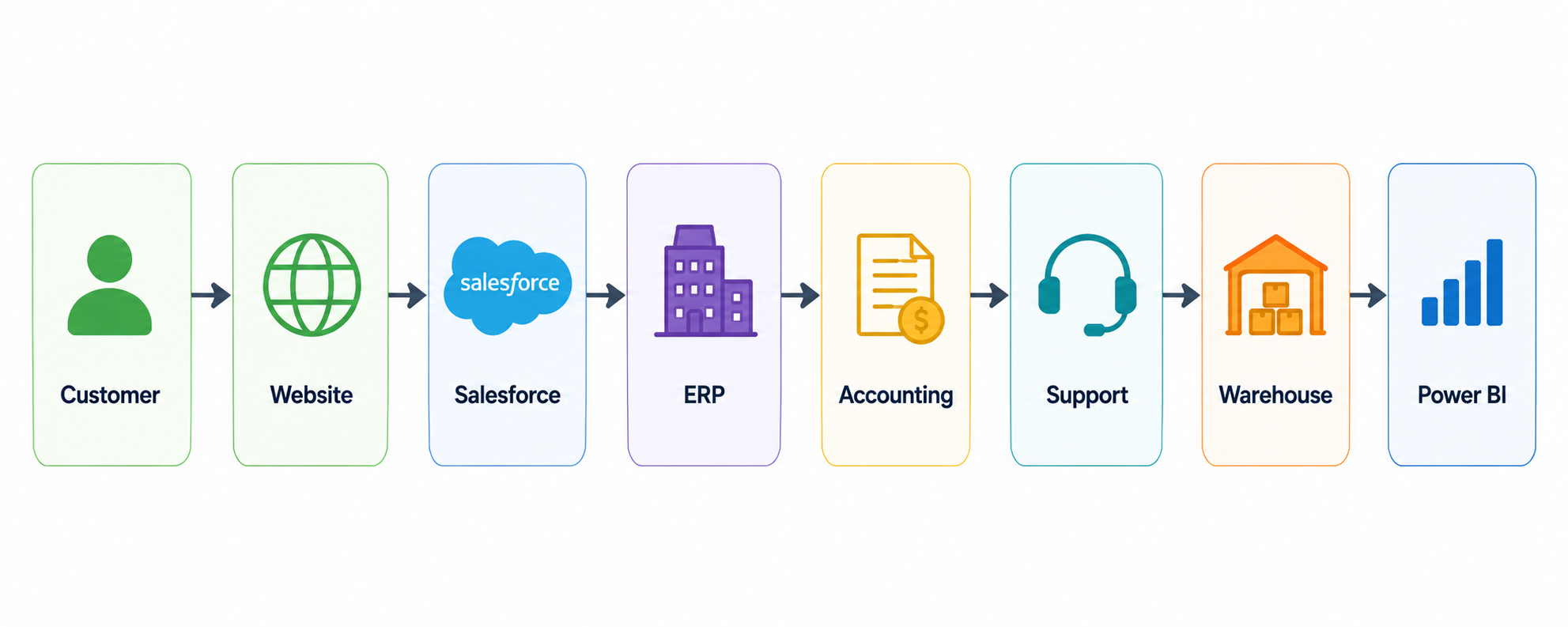
In Reality, the architecture may be more complex.
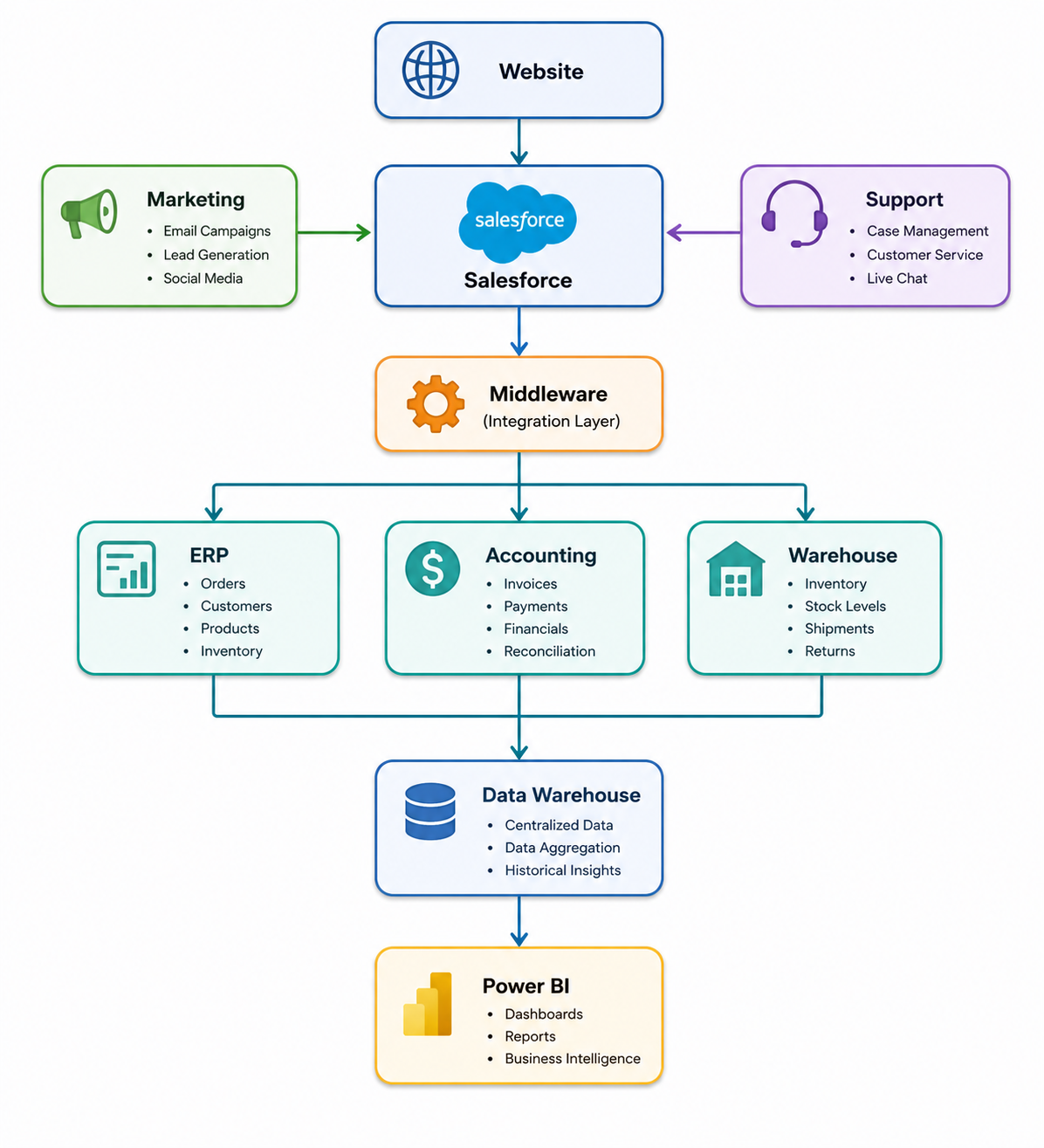
Most businesses don't integrate Salesforce with just one application they build an entire ecosystem. The goal isn't simply to connect systems through APIs. The goal is to enable uninterrupted business operations with accurate, secure, and reliable data flow.
Before implementation, document the following:
Which systems send data to Salesforce
Which systems receive data from Salesforce
Which application is the source of truth
What data is synchronised between systems
How frequently data moves (real-time, scheduled, or batch)
What happens if data synchronisation fails
Who owns and maintains each integration
💡 Key Takeaway
Your Salesforce integration map becomes the foundation for every architecture decision. A well-documented data flow reduces implementation risks, improves scalability, and makes future integrations much easier to manage.
Not Every Salesforce API Solves the Same Problem
A common mistake is choosing a Salesforce API because it is popular or familiar. The better approach is to start with your business requirement and then select the API that best fits your integration needs.
So, Which Salesforce API Should You Use?
| API | Best For | Communication | Data Format |
|---|---|---|---|
| REST API | Web applications, mobile apps, third-party integrations | Synchronous | JSON, XML |
| SOAP API | Enterprise and legacy systems requiring strict contracts | Synchronous | XML |
| Connect REST API | Salesforce Chatter, feeds, files, and social collaboration | Synchronous | JSON, XML |
| User Interface API | Building custom Salesforce user interfaces with metadata | Synchronous | JSON |
| Analytics REST API | Accessing CRM Analytics dashboards and reports | Synchronous | JSON, XML |
| Bulk API | Importing, exporting, or processing millions of records | Asynchronous | CSV, JSON, XML |
| Metadata API | Deploying metadata, custom objects, fields, and configurations | Asynchronous | XML |
| Pub/Sub API | Event-driven integrations and real-time messaging | Asynchronous | Binary (Protocol Buffers) |
| Apex REST API | Exposing custom Apex business logic as REST services | Synchronous | JSON, XML, Custom |
| Apex SOAP API | Exposing Apex methods for SOAP-based integrations | Synchronous | XML |
| Tooling API | Development tools, code analysis, and metadata management | Synchronous | JSON, XML |
| GraphQL API | Fetching related Salesforce data with a single request | Synchronous | JSON |
A Day in the Life of a Salesforce API Request
Imagine a customer placing an order on your website. Although it appears to be a single action, multiple business systems communicate in real time behind the scenes to complete the transaction.
What Happens Behind the Scenes?
From the customer's perspective, this feels like a single transaction. Behind the scenes, however, multiple systems exchange information almost instantly to complete the process.
For example, when a customer submits an order:
The website validates the customer's information.
The payment gateway confirms the transaction.
The integration layer sends customer and order data to Salesforce.
Salesforce creates or updates the appropriate records.
The ERP receives the order details.
The warehouse management system updates inventory.
An automated confirmation email is sent to the customer.
Reporting and analytics dashboards receive the latest business data.
💡 Key Takeaway
The API itself isn't the business outcome. It is the mechanism that enables Salesforce, ERP, payment systems, warehouses, and other applications to work together as one connected business operation.
Which Salesforce API Fits Your Business Scenario?
Different businesses have different integration requirements. Here are some common Salesforce integration scenarios.
Healthcare
Patient portals
Appointment systems
Billing platforms
Insurance systems
Integration Priority: Security, data privacy, controlled access, and reliable data synchronisation.
Manufacturing
ERP systems
Inventory management
Warehouse systems
Production platforms
Integration Priority: High-volume data processing, inventory updates, and reliable system-to-system synchronisation.
Real Estate
Property portals
Website lead forms
WhatsApp
Marketing platforms
Payment gateways
Example Workflow:
Property Portal → Lead Capture → Salesforce → Lead Assignment → WhatsApp Follow-Up → Property Viewing → Deal Management
Integration Priority: Fast lead capture, automated follow-ups, and keeping property and customer information synchronised.
Banking & Financial Services
Core banking systems
Loan management platforms
KYC systems
Payment systems
Integration Priority: Strong security, auditability, controlled data access, and reliable transaction processing.
The 10 Most Expensive Salesforce Integration Mistakes
After more than 10 years of Salesforce experience, MV Clouds has seen that integration problems are rarely caused by a single piece of code. Most issues begin with architectural decisions made before development starts.
Here are 10 common Salesforce integration mistakes to avoid.
Integrating Duplicate Customer Records
If multiple systems store customer information, define a strategy to identify and prevent duplicate records across your ecosystem.
Ignoring API Governor Limits
An integration may work during testing but fail under production traffic. Estimate API consumption before implementation.
Hardcoding Credentials
Never embed credentials directly into application code. Use secure authentication and credential management practices.
Building Without Retry Logic
Temporary failures happen. Implement retry mechanisms to recover failed transactions without creating duplicate records.
Skipping API Monitoring
Monitor integrations continuously and configure alerts so failures are detected before users report them.
Choosing Real-Time Integration When Scheduled Sync Is Enough
Not every process requires real-time communication. Scheduled synchronisation is often simpler, more reliable, and more cost-effective.
Ignoring API Versioning
Salesforce APIs evolve over time. Plan for API version management and future upgrades.
Skipping Sandbox Testing
Always validate integrations in a Salesforce Sandbox before deploying to production.
Having No Rollback Strategy
Define a rollback or recovery plan before deployment in case unexpected issues occur after release.
Failing to Document Ownership
Every integration should have a clearly defined owner responsible for maintenance, monitoring, credentials, and change approvals.
The owner should know:
Who maintains the integration
Who monitors it
Who handles failures
Who manages credentials
Who approves changes
💡 Key Takeaway
Most Salesforce integration failures are caused by poor planning rather than poor code. Strong architecture, governance, monitoring, and documentation significantly reduce long-term integration risks.
How Enterprise Teams Design Salesforce Integrations
Enterprise Salesforce integrations follow a structured process rather than simply writing API code. This approach helps organisations build integrations that are secure, scalable, and easier to maintain.
Traditional Approach:
Choose API → Write Code → Deploy
A More Mature Approach:
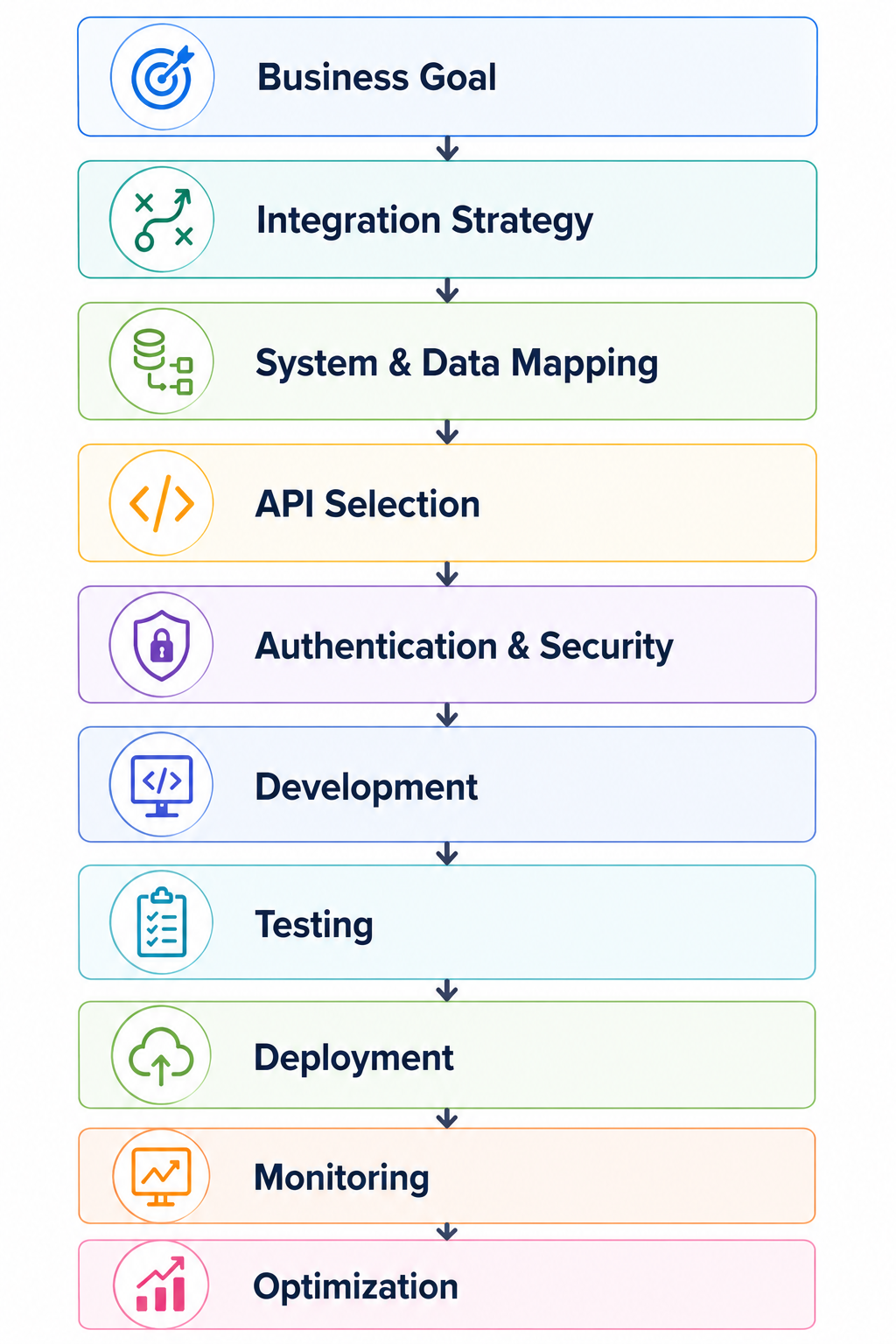
Each stage answers a different question:
Business Goal: Define the business problem and expected outcomes.
Integration Strategy: Decide how Salesforce will communicate with other systems.
System & Data Mapping: Identify the systems involved and map the data that needs to be exchanged.
API Selection: Choose the Salesforce API that best fits the integration requirements.
Authentication & Security: Configure secure access using OAuth, Connected Apps, and appropriate permissions.
Development: Build the integration using APIs, middleware, or custom code.
Testing: Verify functionality, performance, and error handling in a Salesforce Sandbox.
Deployment: Release the integration to production using a controlled deployment process.
Monitoring: Track API usage, logs, and system health to identify issues quickly.
Optimization: Continuously improve performance, scalability, and reliability as business needs evolve.
Organisations move beyond simply connecting Salesforce to building a reliable integration architecture that supports long-term business growth, scalability, and operational efficiency.
When Should You Build In-House vs Hire Salesforce API Integration Services?
Not every Salesforce integration requires an external partner. For straightforward projects, your internal development team may have everything they need. However, complex Salesforce ecosystems often benefit from experienced Salesforce architects and integration specialists.
| Consideration | In-House | Integration Partner |
|---|---|---|
| One simple application | ✓ | |
| Multiple enterprise applications | ✓ | |
| Low API volume | ✓ | |
| Millions of records | ✓ | |
| Internal Salesforce developers | ✓ | |
| Complex integration architecture | ✓ | |
| Basic automation | ✓ | |
| Multiple APIs and middleware | ✓ | |
| Strong internal architecture expertise | ✓ | |
| Certified Salesforce architects required | ✓ | |
| Long-term integration governance | ✓ |
If you're connecting one application with a simple data flow, internal development may be sufficient. If you're connecting multiple enterprise systems with complex data, security, scalability, and monitoring requirements, Salesforce API integration services may be the safer choice.
The right decision depends on your team's skills, project complexity, timeline, budget, and long-term maintenance requirements.
💡 Key Takeaway
Simple integrations can often be handled in-house, while enterprise-scale integrations usually benefit from experienced Salesforce integration specialists to reduce risk and ensure long-term scalability.
Final Thoughts
Salesforce integration success isn't dependent on how many systems are connected. You can measure it by how little your teams have thought about the connections between them.
When customer data moves seamlessly between systems:
Sales teams spend less time entering information.
Operations teams get better visibility.
Managers make faster decisions.
Customers receive a more consistent experience.
The right Salesforce API is only one part of the equation.
Business requirements, integration architecture, data governance, security, monitoring, and scalability turn an API connection into a long-term business advantage.
If you're planning a Salesforce integration, start with the business problem, not the API documentation.
Then map your systems, define your data flows, select the right integration approach, and build an architecture that supports your business today and as it grows.
Need Salesforce API Integration Expertise?
MV Clouds brings 10+ years of Salesforce experience in integration architecture, custom development, API implementation, and Salesforce consulting. Whether you're integrating one application or building an enterprise-wide ecosystem, our experts can help you design a secure, scalable, and future-ready solution.
Ready to get started? Contact the MV Clouds team to discuss your Salesforce integration requirements and build an integration strategy that grows with your business.
Frequently Asked Questions
1. Why should I integrate Salesforce with other business applications?
Integrating Salesforce with your business applications eliminates manual data entry, improves data accuracy, automates workflows, and gives teams access to up-to-date information across all connected systems.
2. Can Salesforce integrate with ERP, accounting, and marketing platforms?
Yes. Salesforce can integrate with ERP systems, accounting software, marketing platforms, websites, warehouses, payment gateways, and many other business applications using Salesforce APIs and integration tools.
3. What is the difference between real-time and batch Salesforce integration?
Real-time integration updates data immediately after an event occurs, while batch integration processes data at scheduled intervals. The right approach depends on your business requirements, data volume, and response time expectations.
4. How can I secure a Salesforce API integration?
Secure Salesforce integrations use OAuth authentication, Connected Apps, appropriate permission sets, secure credential management, and continuous monitoring to protect business data and prevent unauthorized access.
5. How long does it take to implement a Salesforce API integration?
The implementation timeline depends on the number of systems involved, data complexity, security requirements, testing, and business processes. Simple integrations can be completed relatively quickly, while enterprise integrations require more planning and validation.
