
Salesforce Sales Cloud vs Service Cloud: Which One Should You Choose?

Choosing the right customer relationship management (CRM) solution is more than an IT investment. It is a strategic decision that directly impacts revenue growth, customer satisfaction, operational efficiency, and long-term scalability.
When businesses evaluate Salesforce CRM solutions, Sales Cloud and Service Cloud are often compared. While both are built on the Salesforce Platform and share many core CRM capabilities, they are designed to solve different business challenges.
Sales Cloud helps organizations generate, manage, and close more sales opportunities, whereas Service Cloud enables customer support teams to deliver faster, personalized service across multiple communication channels.
Many organizations struggle to determine which solution best fits their needs. A growing business may need to improve sales performance before investing in customer support, while another organization may require stronger service capabilities to manage increasing customer inquiries.
Choosing the wrong solution can result in underutilized features, inefficient workflows, higher implementation costs, and slower user adoption.
Before making an investment, decision-makers should understand the key differences between Salesforce Sales Cloud and Service Cloud. Rather than comparing features alone, businesses should evaluate their long-term goals, operational processes, and overall business objectives.
Example Business Scenarios
B2B Software Company: A business struggling with lead management, sales forecasting, and pipeline visibility will typically gain more value from Sales Cloud.
eCommerce Business: A company managing thousands of customer inquiries every month is more likely to benefit from Service Cloud to improve response times and customer satisfaction.
Real Estate Company: Businesses managing both property sales and post-sale customer support often achieve the best results by implementing both Sales Cloud and Service Cloud together to create a seamless customer journey.
The right choice depends less on which cloud offers more functionality and more on which one addresses your organization's most pressing business challenges.
Quick Answer: Salesforce Sales Cloud vs Service Cloud
Sales Cloud helps businesses acquire customers and increase revenue, while Service Cloud helps businesses retain customers by delivering exceptional customer support experiences.
Both solutions are built on the Salesforce Platform and share the same customer data model. However, they support different stages of the customer lifecycle.
Sales Cloud enables sales teams to manage leads, opportunities, accounts, contacts, forecasts, and sales pipelines more efficiently, helping them close deals faster.
Service Cloud equips customer service teams with tools to manage cases, automate support processes, provide omnichannel customer service, and resolve issues quickly and efficiently.
For many organizations, the decision is not about selecting the "better" product. Instead, it is about investing in the business function that requires the greatest improvement today.
Choose Sales Cloud if your priority is increasing revenue, improving sales productivity, and managing your sales pipeline.
Choose Service Cloud if your priority is improving customer support, reducing response times, and enhancing customer satisfaction.
Choose Both if your business requires a complete customer lifecycle solution covering both sales and customer service.
Shared Salesforce Foundation
What Sales Cloud and Service Cloud Have in Common
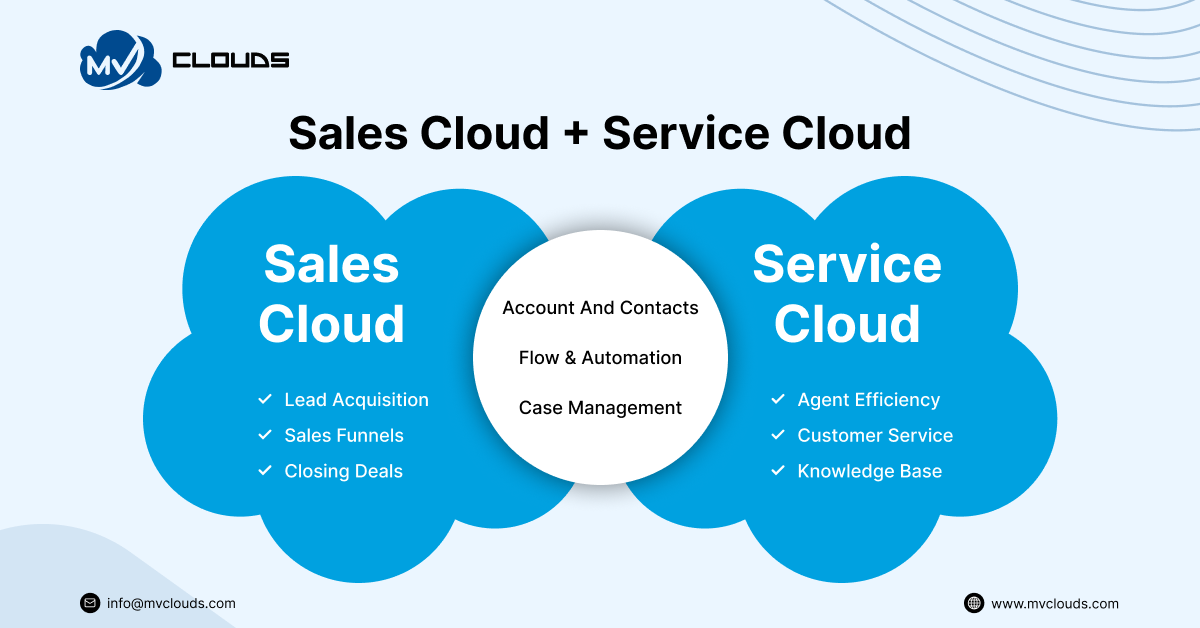
Before comparing Salesforce Sales Cloud vs Service Cloud, it's important to understand that both solutions are built on the same Salesforce Platform. They share a common CRM foundation, including accounts, contacts, activities, reports, dashboards, security, automation, AI, and mobile capabilities. Rather than choosing between two different CRM systems, organizations are selecting specialized applications designed for different business functions.
Whether you implement Sales Cloud, Service Cloud, or both, you'll benefit from the same scalable platform, unified customer data, enterprise-grade security, and low-code customization tools. This shared foundation allows sales and service teams to collaborate seamlessly while maintaining a single source of truth for customer information.
Key Features: Salesforce Sales Cloud vs Service Cloud
Although Sales Cloud and Service Cloud are built on the same Salesforce Platform,their feature sets are designed for different business functions.
Sales Cloud focuses on helping sales teams convert prospects into customers, while Service Cloud enables support teams to resolve customer issues and deliver exceptional customer service experiences.
| Feature | Sales Cloud | Service Cloud |
|---|---|---|
| Lead Management | ✓ Native | — |
| Opportunity Management | ✓ Native | — |
| Account & Contact Management | ✓ | ✓ |
| Case Management | — | ✓ Native |
| Sales Forecasting | ✓ | — |
| Quotes & Products | ✓ | Limited |
| Campaign Management | ✓ | — |
| Service Console | — | ✓ |
| Knowledge Base | — | ✓ |
| Omni-Channel Routing | — | ✓ |
| Entitlements & Milestones | — | ✓ |
| Email-to-Case | — | ✓ |
| Macros & Quick Text | — | ✓ |
| Reports & Dashboards | ✓ | ✓ |
| Flow Automation | ✓ | ✓ |
| Einstein AI & Agentforce | ✓ | ✓ |
| Mobile App | ✓ | ✓ |
| API & Integrations | ✓ | ✓ |
1. Lead Management
Salesforce Sales Cloud
Lead Management is one of the core capabilities of Sales Cloud. It enables organizations to capture leads from web forms, marketing campaigns, events, referrals, and third-party applications. Sales representatives can qualify leads, assign ownership automatically, and convert qualified leads into accounts, contacts, and opportunities.
Key capabilities:
Lead capture
Lead assignment rules
Lead scoring
Duplicate management
Lead conversion
Web-to-Lead
Salesforce Service Cloud
Service Cloud doesn't provide dedicated lead management because it focuses on supporting existing customers rather than acquiring new ones. However, service agents can still access Account and Contact records when assisting customers.
Business Value: Helps sales teams respond faster, prioritize qualified prospects, and increase conversion rates.
2. Opportunity Management
Salesforce Sales Cloud
Opportunity Management provides complete visibility into every sales deal.
Sales teams can:
Track opportunity stages
Monitor deal value
Record competitors
Manage products
Generate quotes
Forecast revenue
Managers gain real-time insight into pipeline health and deal progression.
Salesforce Service Cloud
Opportunity Management isn't a primary feature of Service Cloud. Although support agents can view opportunities when both clouds are implemented together, they typically don't manage the sales pipeline.
Business Value: Improves forecasting accuracy while helping sales representatives focus on high-value opportunities.
3. Case Management
Salesforce Service Cloud
Case Management is the foundation of Service Cloud.
Every customer issue becomes a Case that can be:
Automatically assigned
Prioritized
Categorized
Escalated
Tracked until resolution
Cases can originate from:
Email
Phone
Chat
Web Forms
Social Media
Messaging Apps
Salesforce Sales Cloud
Sales Cloud doesn't include case management as its primary business process. Organizations requiring customer support typically implement Service Cloud alongside Sales Cloud.
Business Value: Ensures every customer issue is tracked, assigned, and resolved efficiently while improving service quality.
4. Sales Forecasting
Salesforce Sales Cloud
Sales Forecasting enables managers to predict future revenue based on active opportunities.
Forecasts can be generated using:
Pipeline value
Opportunity stages
Probability
Quotas
Territory performance
Salesforce Service Cloud
Service teams generally measure operational performance rather than revenue, making forecasting a Sales Cloud capability.
Business Value: Supports strategic planning, budgeting, and sales performance management.
5. Service Console
Salesforce Service Cloud
The Service Console is a workspace designed specifically for support agents.
It enables agents to:
View customer history
Manage multiple cases
Access Knowledge Articles
Switch between conversations
Handle multiple channels simultaneously
Salesforce Sales Cloud
Sales Cloud provides Lightning apps for sales users but doesn't include the Service Console experience.
Business Value: Reduces average handling time and improves agent productivity by providing a unified workspace.
6. Knowledge Management
Salesforce Service Cloud
Knowledge enables organizations to create and manage articles that help both agents and customers solve common issues.
Articles may include:
FAQs
Troubleshooting guides
Product documentation
Policy information
Knowledge articles can also power customer self-service portals and AI-driven recommendations.
Salesforce Sales Cloud
Sales Cloud doesn't include Knowledge as a core sales capability.
Business Value: Reduces repetitive support requests while improving first-contact resolution.
7. Omni-Channel Routing
Salesforce Service Cloud
Omni-Channel automatically routes incoming work to the most appropriate support agent based on:
Skills
Capacity
Availability
Priority
Supported channels include:
Chat
Messaging
Email
Voice
Cases
Salesforce Sales Cloud
Sales teams typically rely on Lead Assignment Rules and Opportunity ownership rather than Omni-Channel Routing.
Business Value: Improves workload distribution and reduces customer wait times.
8. Reporting: Sales KPIs vs Support KPIs
One of the biggest advantages of both Sales Cloud and Service Cloud is Salesforce's powerful reporting and analytics capabilities. Since both solutions are built on the same platform, users can create custom reports, dashboards, and real-time analytics. The difference lies in what each team measures and how those insights drive business decisions.
Sales teams focus on revenue growth, pipeline health, and forecasting, whereas service teams prioritize customer satisfaction, case resolution, and operational efficiency.
Sales Cloud Reporting
Sales Cloud provides reports that help sales managers monitor pipeline performance, identify bottlenecks, and forecast future revenue.
Common Sales KPIs:
Annual contract value (ACV)
Customer lifetime value (CLV)
New leads in pipeline
Average age of leads in pipeline
Conversion rate
Rep retention
Average rep ramp time
Referrals
Customer retention
Average Deal Size
Forecast Accuracy
Quota Attainment
Activity Performance (Calls, Meetings, Emails)
Business Value: Sales leaders use these reports to identify high-performing sales representatives, improve forecasting accuracy, optimize sales processes, and make informed revenue decisions.
Service Cloud Reporting
Service Cloud reporting focuses on measuring customer support performance and operational efficiency.
Common Support KPIs:
First Response Time (FRT)
Average Resolution Time (ART)
First Contact Resolution (FCR)
Customer satisfaction score (CSAT)
Net Promoter Score (NPS)
Customer effort score (CES)
Ticket volume
Ticket backlog
SLA Compliance
Agent Productivity
Escalation Rate
Rep utilization
Cost per ticket
Business Value: These insights help service managers improve customer experiences, monitor team performance, reduce response times, and ensure service-level agreements are consistently met.
Sales KPIs vs Support KPIs
| Reporting Area | Salesforce Sales Cloud | Salesforce Service Cloud |
|---|---|---|
| Primary Goal | Revenue Growth | Customer Satisfaction |
| Performance Metrics | Pipeline, Revenue, Win Rate | Cases, CSAT, Resolution Time |
| Forecasting | Sales Forecasts | Support Workload Trends |
| Team Productivity | Sales Activities | Agent Efficiency |
| Executive Dashboards | Sales Performance | Service Operations |
Sales Cloud reporting helps organizations predict and grow revenue, while Service Cloud reporting focuses on improving service quality, operational efficiency, and customer satisfaction.
9. AI Features (Einstein & Agentforce)
Both Sales Cloud and Service Cloud leverage Salesforce AI, but the use cases differ.
Sales Cloud AI
Lead Scoring
Opportunity Scoring
Predictive Forecasting
Sales Email Generation
Meeting Summaries
Pipeline Insights
Agentforce for Sales
Service Cloud AI
Case Classification
Case Summaries
AI Reply Suggestions
Knowledge Recommendations
Intelligent Routing
Agentforce for Service
Business Value: AI helps sales teams prioritize revenue opportunities while enabling service teams to resolve customer issues faster and deliver more personalized support.
10. ROI (Return on Investment)
When comparing Salesforce Sales Cloud vs Service Cloud, ROI should be evaluated based on the business outcomes each solution is designed to deliver. Although both platforms can generate significant value, they achieve it through different operational improvements.
ROI from Salesforce Sales Cloud
Sales Cloud delivers value by helping organizations streamline sales processes and increase revenue.
Key ROI Drivers:
Increased lead conversion rates
Faster sales cycles
Higher sales productivity
Improved revenue forecasting
Reduced manual administrative work
Better pipeline visibility
Increased win rates
Example: A B2B software company implementing Sales Cloud automates lead assignment and opportunity tracking. Sales representatives spend less time updating spreadsheets and more time engaging prospects, resulting in faster deal closures and improved revenue predictability.
Businesses working with experienced salesforce sales cloud consultants can further improve ROI by customizing sales processes and dashboards to match their unique business requirements.
MV Clouds client success story
A regional B2B distributor achieved 92% Salesforce user adoption after implementing Salesforce Sales Cloud. See how the project improved CRM adoption, sales processes, and reporting in our case study.
Read Case Study → How Salesforce Sales Cloud Delivered 92% User Adoption for a Regional B2B Distributor
ROI from Salesforce Service Cloud
Service Cloud generates value by improving customer support operations and strengthening long-term customer relationships.
Key ROI Drivers:
Faster case resolution
Higher customer satisfaction
Improved customer retention
Lower support costs
Increased agent productivity
Reduced manual service tasks
Better SLA compliance
Example: A retail company uses Service Cloud to automate case routing and provide agents with a centralized customer view. The result is shorter response times, higher CSAT scores, and reduced operational costs.
Organizations implementing salesforce service cloud implementation services often maximize ROI by automating repetitive service workflows and integrating multiple support channels into a unified platform.
11. Implementation Complexity
Although both products run on the Salesforce Platform, implementation complexity varies depending on business processes, integrations, and customization requirements.
Salesforce Sales Cloud Implementation
Sales Cloud implementations typically focus on configuring the sales lifecycle.
Common Configuration Areas:
Lead Management
Opportunity Stages
Sales Processes
Products & Price Books
Quotes
Forecasting
Approval Processes
Territory Management
Sales Dashboards
Organizations often engage salesforce sales cloud implementation services to standardize sales workflows, migrate data, and integrate third-party sales tools.
Complexity Level: Medium, depending on the size of the sales organization and integration requirements.
Salesforce Service Cloud Implementation
Service Cloud implementations usually involve more operational workflows and customer service channels.
Common Configuration Areas:
Case Management
Omni-Channel Routing
Email-to-Case
Web-to-Case
Knowledge Base
Entitlements
Milestones
Service Console
Digital Engagement
SLAs
Complexity Level: Medium to High, particularly for organizations supporting multiple communication channels or complex service processes.
12. Customization
Both Sales Cloud and Service Cloud are highly customizable because they share the same Salesforce Platform.
Organizations can tailor either solution using:
Custom Objects
Custom Fields
Record Types
Page Layouts
Validation Rules
Salesforce Flow
Apex
Lightning Web Components (LWC)
APIs
AppExchange Apps
The key difference lies in what is being customized.
Sales Cloud Customization
Typically includes:
Sales pipelines
Lead qualification
Opportunity stages
Quote approvals
Revenue forecasting
Territory rules
Service Cloud Customization
Typically includes:
Case lifecycle
Service Console
Escalation processes
Knowledge management
Omni-Channel routing
Customer portals
Customize only where necessary. Over-customization can increase technical debt, complicate upgrades, and make future maintenance more challenging
13. Pricing Considerations
Sales Cloud and Service Cloud follow a user-based licensing model, but the total cost of ownership extends beyond subscription fees.
Organizations should evaluate:
Salesforce edition (Starter, Professional, Enterprise, Unlimited)
Number of users
AI feature availability
Third-party applications
Custom development
Data migration
Integration requirements
User training
Ongoing support and maintenance
Service Cloud projects may also require additional investments in Digital Engagement, Voice, or Field Service, depending on customer support requirements.
Evaluate business requirements before selecting licenses. Purchasing features that your teams won't use can increase costs without delivering additional value.
Which Industries Use Each?
Although both Salesforce Sales Cloud and Service Cloud can be implemented across virtually any industry, certain use cases naturally align with one cloud more than the other.
| Industry | Sales Cloud Use Cases | Service Cloud Use Cases |
|---|---|---|
| Manufacturing | Dealer management, B2B sales pipeline, distributor opportunities | Warranty claims, product support, field service coordination |
| Healthcare | Provider relationship management, patient acquisition, partnership tracking | Patient support, appointment inquiries, care coordination |
| Real Estate | Lead management, property sales, broker pipeline, client follow-ups | Post-sale support, tenant services, maintenance requests |
| Financial Services | Wealth management, loan origination, relationship management | Customer onboarding, service requests, dispute resolution |
| Education | Student recruitment, admissions pipeline, alumni engagement | Student services, enrollment support, help desk operations |
| Retail | B2B account management, franchise sales, wholesale relationships | Returns, order inquiries, customer care, loyalty support |
| Professional Services | Client acquisition, proposal management, business development | Client support, project assistance, service request management |
| SaaS | Opportunity management, subscription sales, renewals | Technical support, onboarding, customer success, subscription assistance |
Can You Use Both?
Yes. In fact, many organizations gain the greatest value by implementing Sales Cloud and Service Cloud together.
Because both solutions are built on the same Salesforce Platform, they share customer records, security settings, automation, reporting, and integrations. This eliminates data silos and enables sales and service teams to work from a single source of truth.
How Both Clouds Work Together
A typical customer journey looks like this:
A prospect is captured and nurtured in Sales Cloud.
The sales team manages opportunities, generates quotes, and closes the deal.
Once the customer is onboarded, Service Cloud takes over for support, case management, and ongoing engagement.
Customer feedback and support history become visible to sales teams, helping them identify upsell, cross-sell, or renewal opportunities.
Benefits of Using Both Clouds
Unified customer data across sales and service.
Better collaboration between teams.
Personalized customer interactions.
Improved customer retention and lifetime value.
End-to-end visibility throughout the customer lifecycle.
Reduced manual data entry and duplicate records.
Consistent reporting and analytics across departments.
Final Thoughts
First, you should know that Salesforce Sales Cloud and Salesforce Service Cloud are built on the same Salesforce platform. Accounts, contacts, activities, reports, dashboards, security, automation, artificial intelligence, and mobile capabilities are all part of the same CRM foundation. Businesses choose specialized CRM applications for different business functions rather than selecting two different CRM systems.
Whether you are planning a new implementation through Salesforce implementation services, working with Salesforce Sales Cloud consultants, or hiring a Salesforce Service Cloud developer to create a customer support solution, both clouds offer a scalable platform, unified customer data, enterprise-class security, and low-code customization capabilities. Together, these technologies enable sales and service teams to collaborate seamlessly while maintaining a single source of truth for customer data.
Contact us to discuss your Salesforce requirements. Our certified Salesforce consultants can help you evaluate your business needs, recommend the right cloud solution, and deliver a scalable implementation tailored to your organization.
FAQs About Sales Cloud vs Service Cloud
1. What is the main difference between Salesforce Sales Cloud and Service Cloud?
Sales Cloud helps businesses manage leads, opportunities, quotes, and sales pipelines to increase revenue. Service Cloud focuses on customer support by providing case management, omnichannel service, knowledge management, and AI-powered support tools.
2. Can I use Salesforce Sales Cloud and Service Cloud together?
Yes. Both clouds run on the same Salesforce Platform and share customer records, automation, reports, dashboards, and security settings. Using both provides a complete customer lifecycle solution from lead generation to post-sale support.
3. Is Salesforce Service Cloud included with Sales Cloud?
No. Sales Cloud and Service Cloud are separate Salesforce products with different licenses. Although they share the same platform, each includes features designed for different business functions.
4. Which cloud is better for small businesses?
It depends on your business goals. Small businesses focused on sales growth typically start with Sales Cloud, while businesses with high customer support volumes often benefit more from Service Cloud.
5. What industries commonly use Salesforce Sales Cloud and Service Cloud?
Sales Cloud is widely used in manufacturing, real estate, financial services, healthcare, SaaS, and professional services for managing sales processes. Service Cloud is commonly used by businesses that require customer support, case management, and omnichannel service.
6. Which Salesforce cloud is better for lead management?
Sales Cloud is the better choice for lead management because it includes lead capture, lead assignment, lead conversion, opportunity management, and sales forecasting.
7. Which Salesforce cloud offers better ROI?
Sales Cloud delivers ROI by increasing sales productivity, improving pipeline visibility, and accelerating revenue growth. Service Cloud delivers ROI by reducing support costs, improving customer satisfaction, and increasing customer retention.
8. Do I need a Salesforce implementation partner?
Yes. Working with experienced Salesforce consultants helps ensure proper configuration, data migration, automation, user adoption, and long-term scalability while reducing implementation risks.
9. Does Sales Cloud include customer support features?
Sales Cloud provides basic customer information and activity tracking but does not include advanced customer support capabilities such as case management, omnichannel routing, or knowledge management. These features are available in Service Cloud.
